

Pixie vs Karbon (vs Uku): Which Practice Management Software Actually Fits Your Firm in 2026?


Choosing between Pixie vs Karbon for your accounting practice management often comes down to these fundamental questions:
- Do you need a simple, straightforward tool or a comprehensive platform with advanced features?
- Is your budget better suited for flat-fee pricing or are you comfortable with per-user costs that scale with your team?
- Are you a small firm looking to get organized, or a larger practice needing deep workflow automation and AI-powered insights?
- Would you rather have something you can implement in days, or are you willing to invest weeks in learning a complex system?
- Do you want just the essentials, or do you need extensive reporting and analytics capabilities?
In short, here’s what we recommend:
👉 Pixie is the go-to choice for small to medium accounting firms that prioritize simplicity and affordability. With its flat-fee pricing based on client count (not users), intuitive interface, and focus on core practice management features, it helps firms get organized without the complexity. While Pixie excels at streamlining workflows and reducing manual admin, it lacks the advanced reporting, time tracking depth, and sophisticated automation that growing firms eventually need.
👉 Karbon serves as the enterprise-grade solution for larger accounting firms that need comprehensive features and don’t mind the complexity. Its powerful workflow automation, deep email integration through Triage, and Practice Intelligence AI capabilities make it a robust platform. However, the per-user pricing starting at $59/month and steep learning curve can be barriers for smaller firms or those just starting their digital transformation.
Both platforms are solid choices for their target markets. But what if you need something more powerful than Pixie yet more accessible than Karbon? That’s where a third option becomes compelling.
👉 Uku bridges the gap with its modular approach to features, offering sophisticated practice management capabilities without the enterprise complexity or pricing. Its automated billing system can significantly reduce invoicing time while helping firms identify additional profit opportunities through proper time tracking and agreement monitoring. Combined with an integrated client portal where accountants and clients work on the same tasks (not separate tasks), Uku delivers enterprise-level functionality at competitive pricing.
The team pricing starts from around $38/user/month, making it accessible for growing firms. Used by accounting firms across Europe, USA and beyond, Uku is particularly strong for firms transitioning from Excel who want professional practice management without months of implementation.
If you’re looking for practice management software that grows with your firm without growing your overhead, see how Uku can transform your practice with a 14-day free trial of our all features.
Table of contents:
- Pixie vs Karbon vs Uku at a glance
- The pricing models reveal different philosophies
- Workflow automation capabilities show each platform’s true colors
- Time tracking and billing integration separate the basic from the sophisticated
- Client portal functionality varies dramatically
- Reporting and analytics reveal the maturity gap
- Integration ecosystems reflect target markets
- Learning curve and implementation timeline matter more than features
- Pixie vs Karbon vs Uku: Which should you choose?
Pixie vs Karbon vs Uku at a glance
Here’s how these three platforms fundamentally differ in their approach to practice management:
| Pixie | Karbon | Uku | |
|---|---|---|---|
| Target Market | Small to medium firms (under 10 staff) | Medium to large firms | Small to large firms (10-50 staff) |
| Starting Price | ⭐⭐⭐⭐⭐ $129/month ($1548/year) | ⭐⭐ $79/user/month ($948/user/year) | ⭐⭐⭐⭐ $38/user/month ($456/user/year) |
| Learning Curve | ⭐⭐⭐⭐⭐ Very easy | ⭐⭐ Steep | ⭐⭐⭐⭐⭐ Easy to moderate |
| Workflow Automation | ⭐⭐⭐⭐ Good basics | ⭐⭐⭐⭐⭐ Advanced | ⭐⭐⭐⭐⭐ Comprehensive & modular |
| Time Tracking | ⭐⭐ Basic | ⭐⭐⭐⭐ Integrated | ⭐⭐⭐⭐⭐ Multiple methods |
| Billing & Invoicing | ⭐⭐ Limited | ⭐⭐⭐⭐ Built-in with payments | ⭐⭐⭐⭐⭐ Automated with complex pricing |
| Client Portal | ⭐⭐⭐ Functional | ⭐⭐⭐⭐ Secure with magic links | ⭐⭐⭐⭐⭐ Integrated same-task system |
| Reporting | ⭐⭐ Basic | ⭐⭐⭐⭐⭐ Advanced with AI | ⭐⭐⭐⭐ Comprehensive |
| Free Trial | 30 days | 14 days | 14 days (all features) |
| Implementation Time | Days | Weeks to months | Days to weeks |
| Security | Standard | Enterprise-grade | Strong with EU hosting |
The pricing models reveal different philosophies
The way each platform charges tells you everything about who they’re built for and what they value.
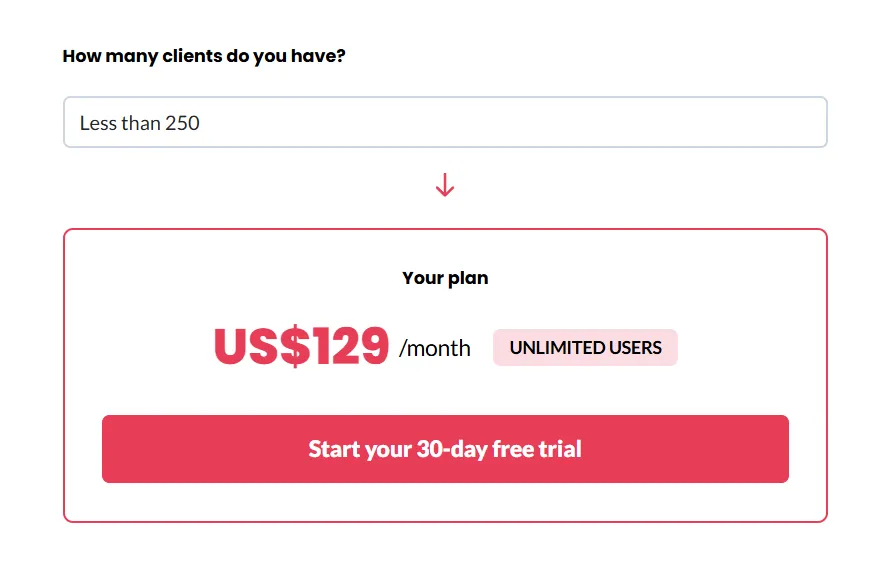
Pixie takes a refreshingly simple approach with flat-fee pricing based on client count:
- Less than 250 clients $129/month,
- 251-500 clients is $199/month,
- 501-1000 clients is $329/month,
- and over 1000 clients require custom pricing.
The model means you can add unlimited team members without additional cost. This is revolutionary for small firms because it provides predictable expenses and lets you scale your team without budget surprises.
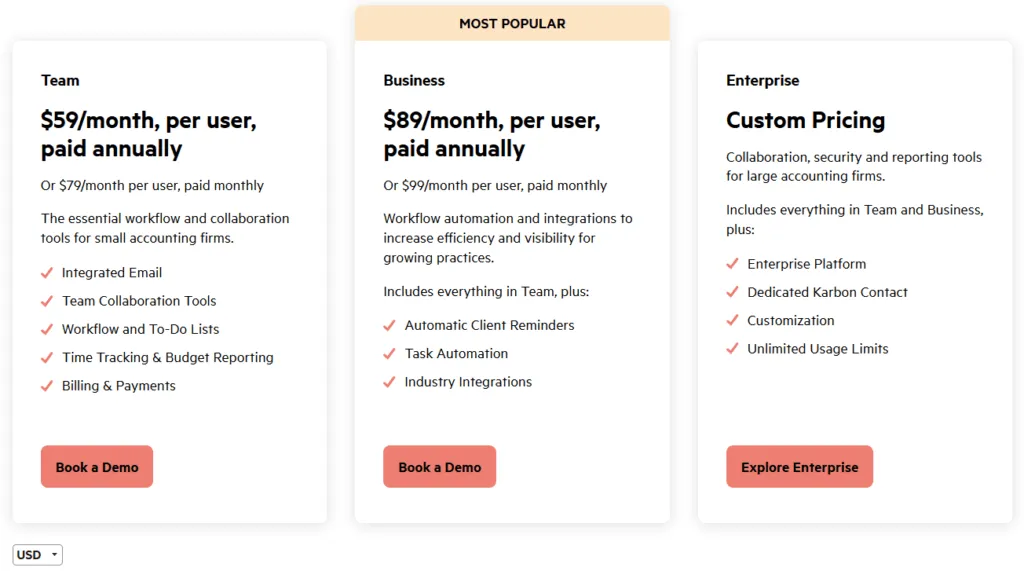
Karbon follows the traditional per-user model that can quickly become expensive.
- Team plan starts at $59/user/month
- Business plan costs $89/user/month
For example, a 10-person firm selecting this tier would pay $890/month.
The platform offers both monthly and annual billing options, with discounts available for annual commitments. A free 14-day trial is available to test the platform before committing.
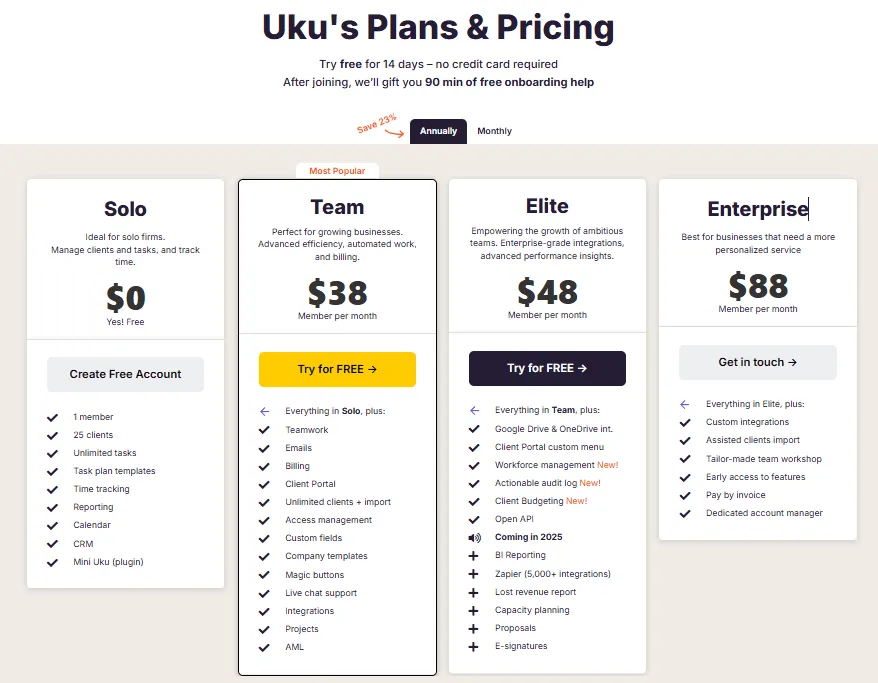
Uku offers flexible per-user pricing that delivers competitive value.
The Team plan Starts at $38/user/month and includes unlimited clients, comprehensive features, and live chat support.
Meanwhile, the Elite plan starts at $48/user/month and offers advanced integrations, reporting, and an automated billing engine
What sets Uku apart is offering 23% off for annual billing and including 2 hours of free onboarding assistance, perfect for firms transitioning from Excel who want professional practice management without the typical implementation headaches.
The pricing philosophy differences are stark: Pixie believes in simplicity and predictability, Karbon targets enterprises with premium features, while Uku provides modular, value-based pricing that grows with your firm’s needs.
Workflow automation capabilities show each platform’s true colors
Workflow automation is where practice management software proves its worth, and each platform takes a notably different approach.
Pixie delivers on its promise of simplicity with straightforward workflow automation.
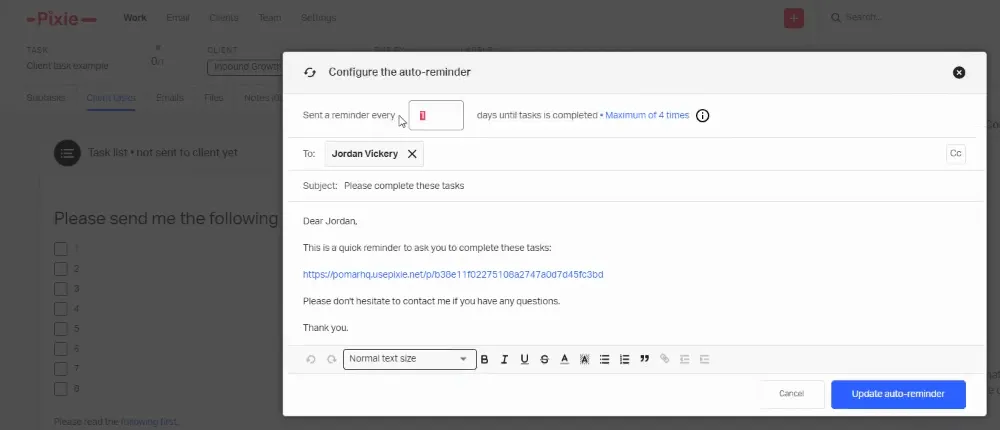
You can create workflow templates for common processes, set up recurring jobs, and automate client reminders. The system includes automatic job assignment and deadline tracking. While effective for basic needs, it’s automation for firms that want to set it and forget it.
Source: Pixie
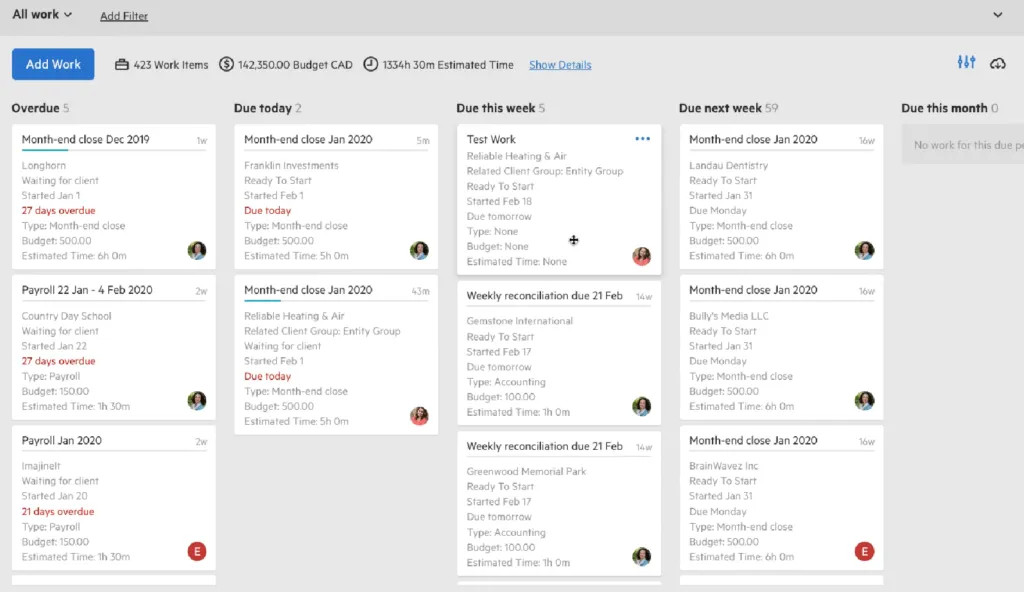
Karbon showcases enterprise-level sophistication with its workflow capabilities.
The three-level hierarchy (work templates to work items to tasks) provides both standardization and flexibility. The Work Scheduler handles recurring patterns, while tasklist automators trigger actions based on conditions.
The Kanban board visualization and My Week personal dashboard are standout features. However, this power comes with complexity that many users report can overwhelm smaller teams.
Source: Karbon
Uku strikes an impressive balance with its modular approach to workflow automation. The system uses a smart three-tier structure: task templates become client task plans, which automatically generate individual tasks.
What’s particularly clever is the date-based recurrence options and automatic handling of holidays. The platform can set tasks to appear on specific days of the week or month, and the browser plugin “Mini Uku” lets you manage workflows from any website.

For firms transitioning from Excel, Uku’s ability to import spreadsheets and quickly set up automated plans addresses accountants’ fear of lengthy implementations
Time tracking and billing integration separate the basic from the sophisticated
How well a platform handles the time-to-cash cycle reveals its understanding of accounting firm economics.
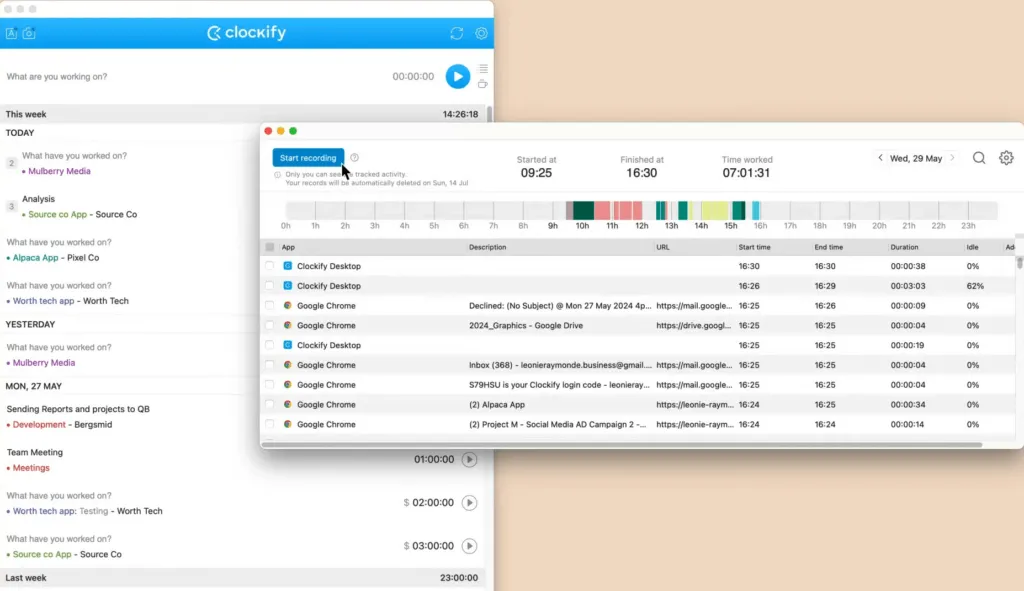
Pixie offers basic time tracking features, though the platform recommends third-party integrations like Toggl or Clockify for more comprehensive tracking. The billing features are similarly limited, with basic functionality that may require additional tools for complex billing scenarios.
Source: Clockify
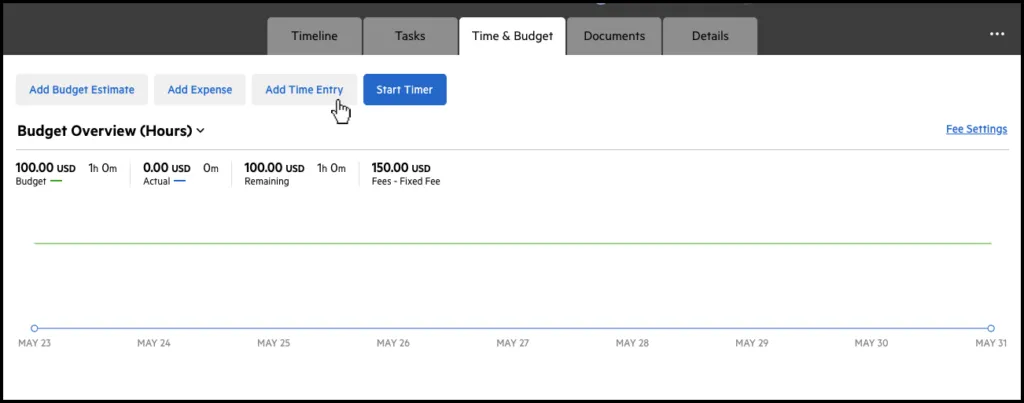
Karbon provides integrated time tracking with billing and payments powered by Stripe. The platform supports multiple billing methods including time and materials, fixed fees, and recurring billing. According to Karbon, their payments feature can reduce payment collection time. The billing module integrates well with the core platform, though smaller firms might find the payment processing fees and setup requirements more than they need.
Source: Karbon
Uku excels with its automated billing system, which the platform positions as a key differentiator. The time tracking offers multiple methods:
- stopwatch
- manual entry
- bulk entry
- automatic time entry based on estimates
The real strength lies in billing automation. Uku supports complex price lists based on quantity, time, material, and ranges with different rates for different periods. The system handles sophisticated rounding rules; for instance, a one-minute unplanned call can be automatically billed as 15 minutes.
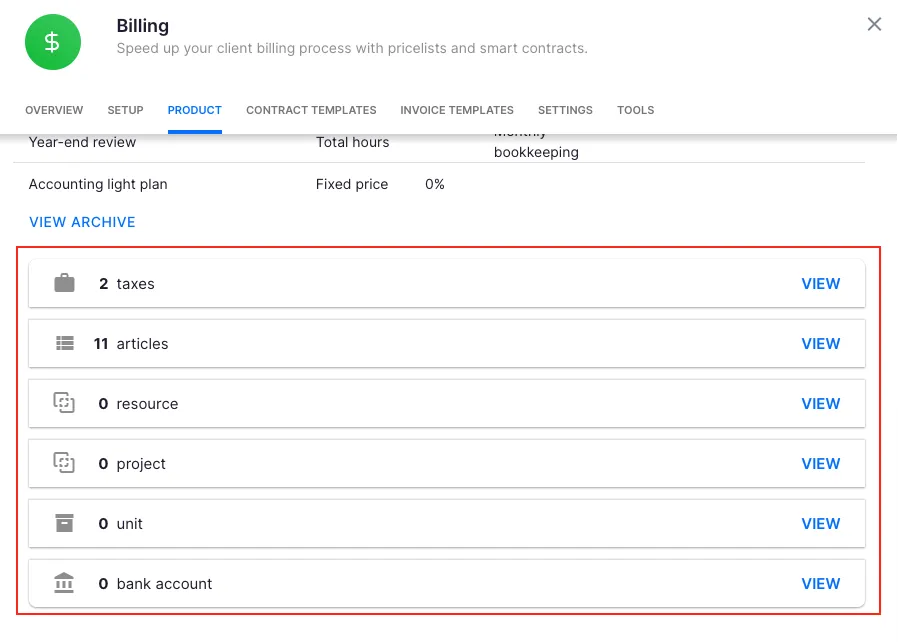
Everything runs through “contracts” where rules are set up once, then time tracking automatically calculates billable amounts. The platform provides detailed reporting on billable versus non-billable hours, helping firms identify efficiency gaps.
According to Uku’s marketing materials, firms can raise profit by 23.5% through better billing practices and agreement monitoring. The platform can generate invoices for over 100 clients in just 30 minutes, significantly reducing what typically takes much longer.
Client portal functionality varies dramatically
The client experience can make or break your practice’s efficiency and reputation.
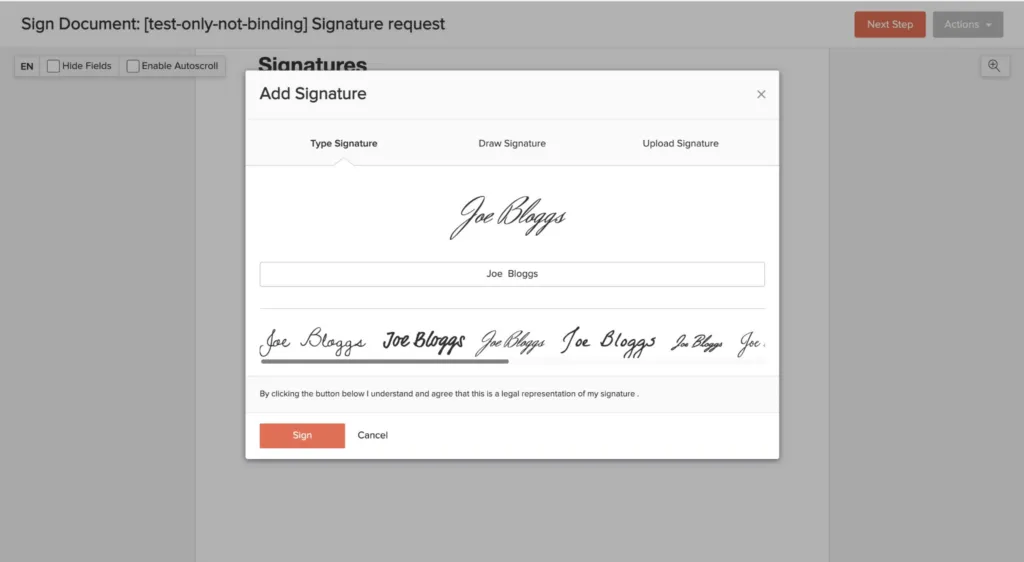
Pixie provides a functional GDPR-compliant client portal for document exchange and e-signatures. Clients can upload documents and complete basic tasks through the secure portal. The functionality covers essential needs, though it’s relatively straightforward compared to more advanced alternatives.
Source: Pixie
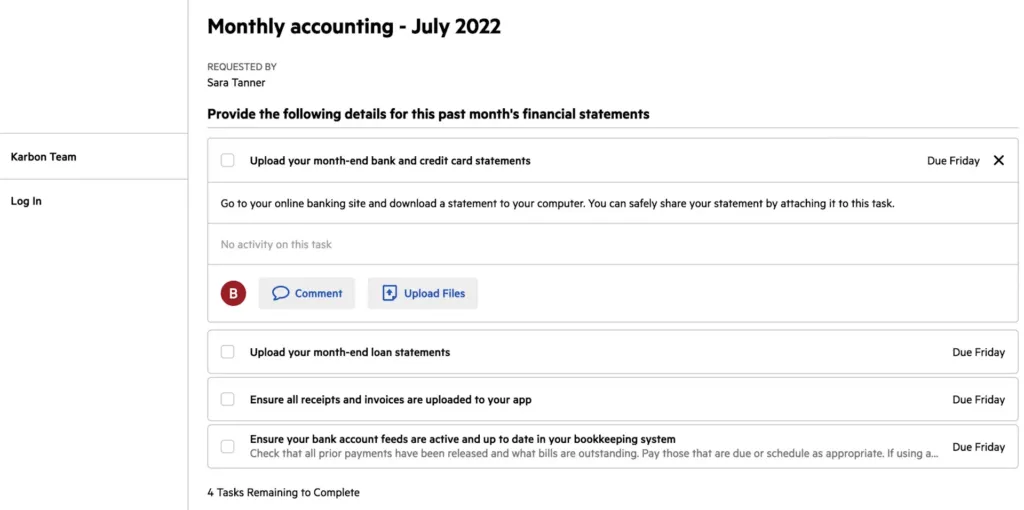
Karbon offers a sophisticated portal with “magic links” that eliminate password hassles. The portal includes:
The integration with Karbon’s workflow means client interactions flow directly into internal processes, automatically linking to firm workflows without duplication.
Source: Karbon
Uku takes a unique approach with its integrated client portal. Unlike traditional portals where tickets must be connected to work items, Uku’s portal mirrors the exact same task on both sides. Clients and accountants work on the same item with communication, files, and task details visible to both parties. When clients make requests through the portal, notifications appear on the accountant’s dashboard for immediate action.
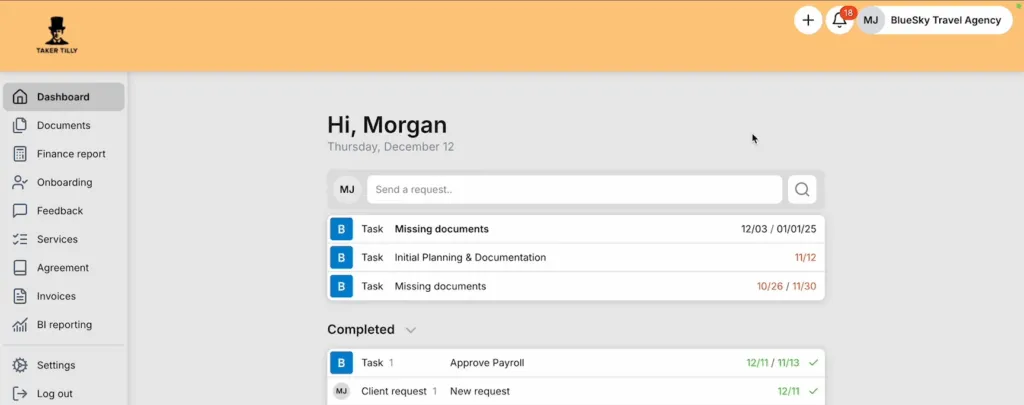
The portal offers extensive customization: firms can brand it with their logo, colors, and custom domain at no extra cost. The ability to create custom menus for each client provides a tailored experience. Firms can run onboarding with forms, share reports, display price lists, and embed custom content. Uku markets this as “the client portal you don’t have to explain to clients,” emphasizing the intuitive design.
The portal includes mobile app access and handles secure document sharing with the ability to submit documents for digitalization with a single click, sending them directly into accounting software.
Reporting and analytics reveal the maturity gap
Data-driven decision making separates growing firms from struggling ones, and reporting capabilities show each platform’s sophistication.
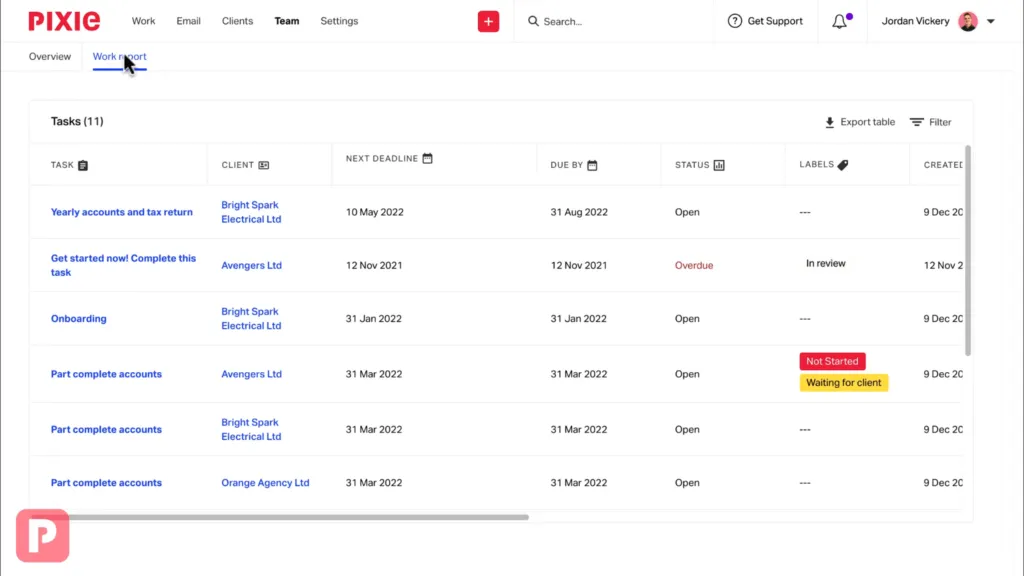
Pixie provides “powerfully simple reporting” that covers essential metrics.
Users can track work stages, task progress, and team workload through customizable reports. While the platform includes some time tracking and client profitability features, the analytics capabilities are basic compared to enterprise solutions. For firms just getting organized, this might suffice, but growing practices may eventually need more depth.
Source: Pixie
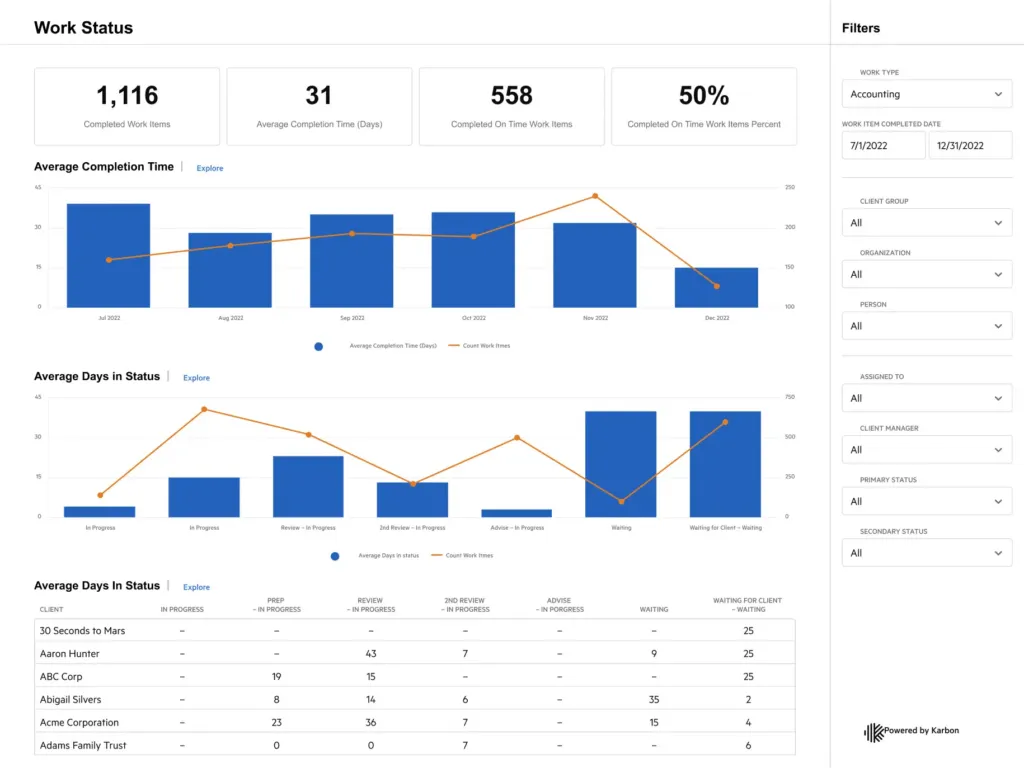
Karbon dominates with its Practice Intelligence feature, offering 12 pre-built dashboards covering everything from billing and budgets to resource planning and client communication. The platform provides real-time, interactive reporting with powerful filtering options.
The ability to connect to external BI tools through Snowflake reader accounts and the AI-powered insights elevate Karbon into enterprise territory. The depth of analytics available can help firms make strategic decisions about pricing, staffing, and service offerings.
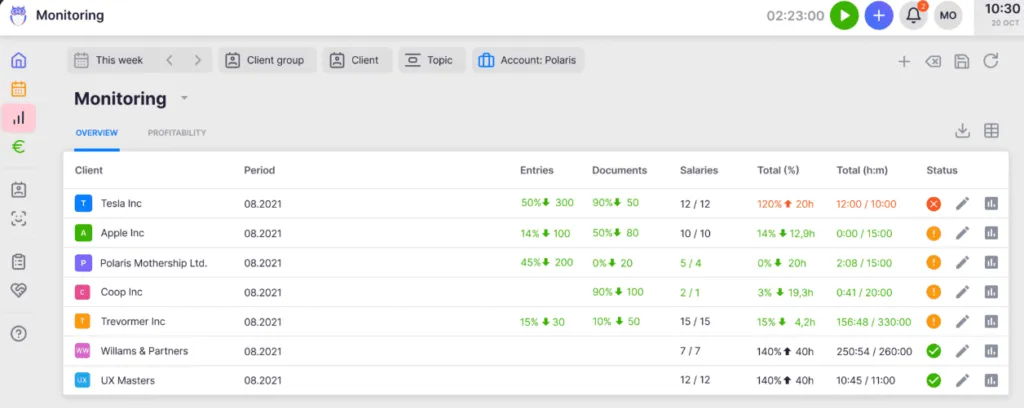
Uku delivers comprehensive Reporting & Analysis with three levels of depth: summary, tasks, and time, with deep filters and saved report templates.
The standout feature is client agreement monitoring, which automatically compares agreed work with actual time spent, highlighting scope creep and potential profitability issues. The system shows detailed breakdowns of billable versus non-billable hours, helping firms identify where time is being lost.
According to Uku’s roadmap, BI reporting features are coming to the Elite plan in 2026, which will provide enhanced visual reports and analytics. For firms wanting data-driven insights without enterprise complexity, Uku provides actionable analytics focused on practical metrics.
Integration ecosystems reflect target markets
The apps and services each platform connects with reveals who they’re really built for.
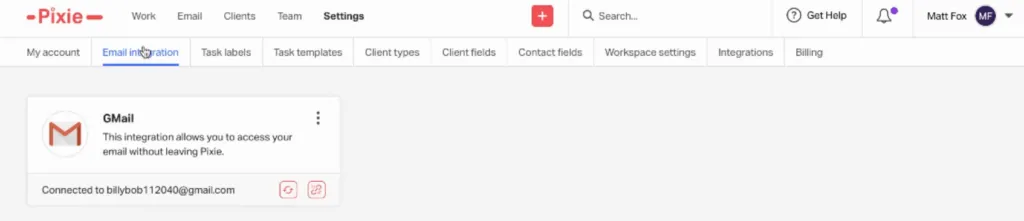
Pixie offers essential integrations including two-way email sync with Gmail and Office 365, Companies House for UK firms, and automation via Zapier. The integration set is functional but limited, reflecting the platform’s focus on simplicity. While adequate for small firms with simple tech stacks, growing practices might find the integration options restrictive.
Source: Pixie
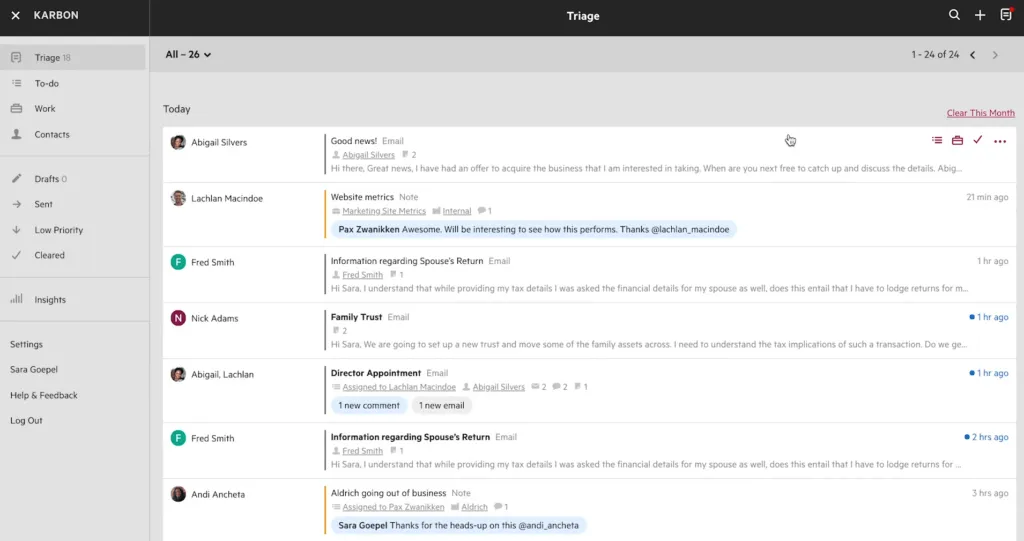
Karbon boasts extensive integrations befitting its enterprise positioning. Direct connections include QuickBooks Online, Xero, Gmail and Microsoft 365, HubSpot CRM, and document management systems (Google Drive, Dropbox, OneDrive/SharePoint). The deep email integration through Triage provides real-time two-way sync with your inbox. However, maximizing these integrations often requires significant setup and configuration time.
Source: Karbon
Uku provides strategic integrations that cover the full accounting workflow with a modular approach. The platform connects with major accounting software (Xero, QuickBooks Online, e-conomic, and regional players), document management systems (Google Drive, OneDrive, SharePoint, Dropbox), and extends capabilities through Zapier to connect with thousands of apps.
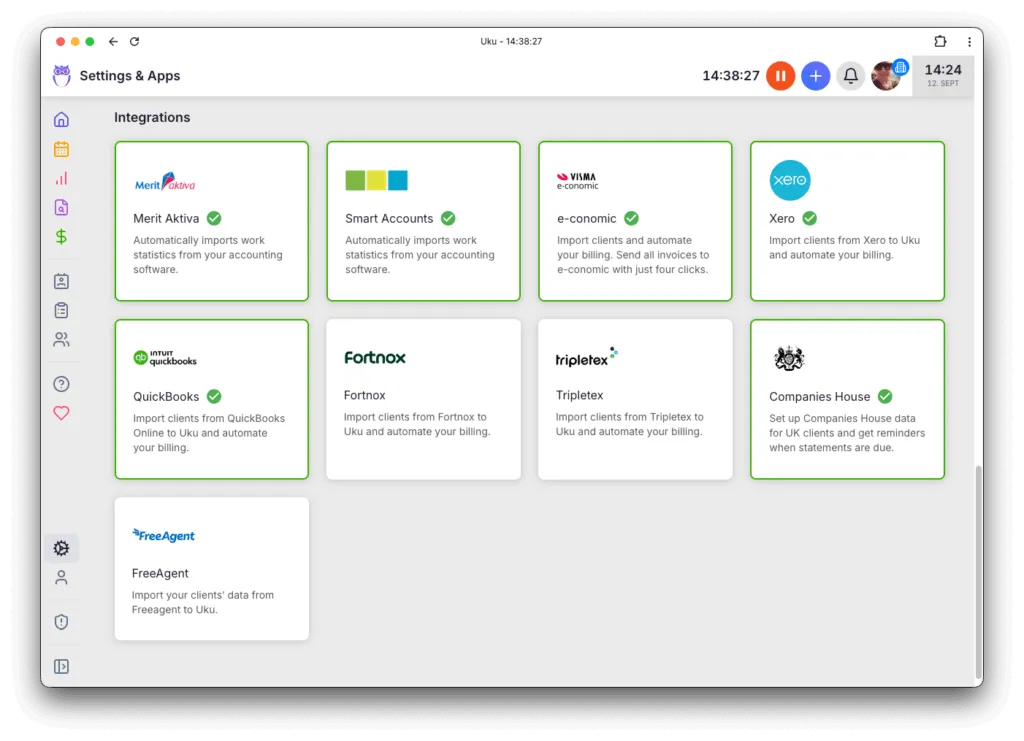
The Companies House integration for UK firms and AML features show understanding of specific market needs. The “Mini Uku” Chrome extension deserves special mention, bringing core functionality to any website without switching tabs. For Enterprise plan customers, Uku offers custom integrations to meet specific needs.
Learning curve and implementation timeline matter more than features
The best features are worthless if your team won’t use them.
Pixie wins on simplicity with user reviews consistently praising the intuitive interface and easy setup.
Users report being productive quickly, with one reviewer noting they were “up and running within an hour.”
The platform offers migration assistance through a dedicated account manager, and the straightforward design means minimal training is required. This is crucial for small firms that can’t afford lengthy implementation projects or extensive staff training.

Source: Capterra
Karbon requires significant investment in learning and implementation. The platform’s power comes with complexity that users describe as having a steep learning curve. Karbon’s own implementation packages range from 4 weeks (Guided) to 8-12 weeks (Guided Plus), indicating the commitment required. While a free trial is available, firms often need dedicated resources for the rollout to be successful.
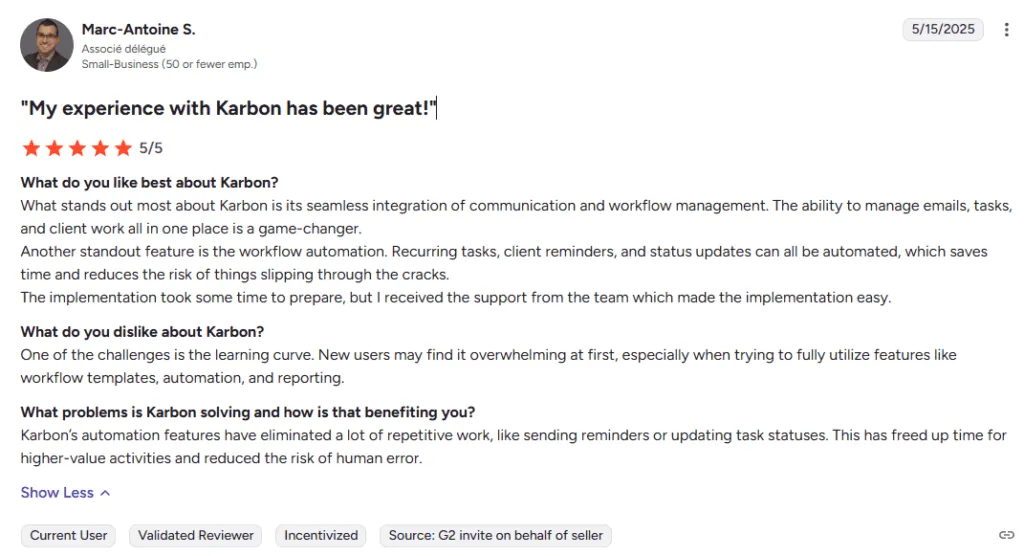
Source: G2
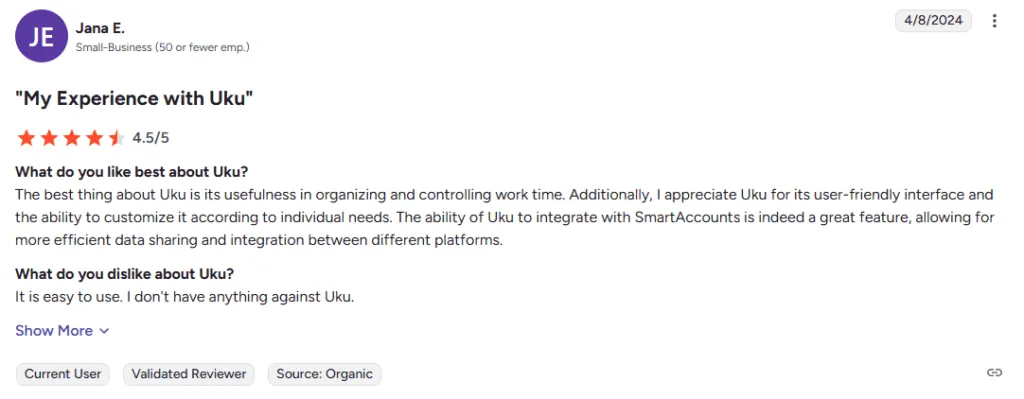
Uku excels at rapid implementation, particularly for firms transitioning from Excel. The platform can import client data and workflow templates from spreadsheets, allowing firms to get started quickly. The 14-day free trial of the Elite plan lets firms experience full functionality risk-free. The platform includes 2 hours of free onboarding help, and users report being productive within days.
The interface is consistently praised as intuitive and easy to use, with “Ease of Use” being a top-mentioned benefit in reviews. Accounting professionals have praised Uku’s planning capabilities, with the platform being recognized for its effective task management approach.
The modular approach means firms can start with just CRM and tasks, then gradually add features as needed, making adoption less overwhelming than all-at-once implementations.
Security and Compliance
While all three platforms take security seriously, the level of certification and transparency varies.
Pixie maintains security practices including encryption and GDPR compliance, with data hosted on AWS, though specific security certifications aren’t prominently advertised on their public pages.
Karbon provides enterprise-grade security with SOC 2 Type II compliance, GDPR adherence, and an ISO-27001 aligned Information Security Management System, befitting its target market of larger firms.
Uku uses TLS 1.3 encryption with data hosted on enterprise-grade Akamai cloud servers in Germany (EU), ensuring GDPR compliance. Uku platform is SOC 2 compliant, going beyond basic hosting standards by implementing robust security controls and undergoing independent external audits. This infrastructure enables Uku to scale from small firms to organizations with organizations with 300 users across 11 countries, demonstrating enterprise-level reliability at accessible pricing.
Pixie vs Karbon vs Uku: Which should you choose?
The choice depends on your firm’s size, ambitions, and tolerance for complexity.
Choose Pixie if:
- You’re a small firm (under 10 people) prioritizing simplicity
- You want predictable costs regardless of team size
- Basic features meet your current needs
- You need to get organized quickly without extensive training
- Your budget is tight and you prefer flat-fee pricing
Get started with Pixie for a simple, stress-free setup.
Choose Karbon if:
- You’re a larger firm with dedicated project manager and IT resources
- You need enterprise-grade features and AI-powered insights
- Deep email integration and collaboration are critical
- You’re willing to invest significant time and money in implementation
- You want a platform that can handle complex, multi-faceted workflows
Book a demo with Karbon to explore enterprise-level efficiency.
Choose Uku if:
- You want to minimize your team’s admin time through automated billing
- You’re transitioning from Excel and need manageable implementation
- You want powerful features with a modular approach (start simple, add as you grow)
- Automated billing that can save significant time appeals to you
- You need an integrated client portal where clients and accountants work on the same tasks
- You value quick implementation with strong ongoing support
- You’re looking for competitive value in features per dollar spent
Ready to see why accounting firms across Europe, USA and beyond choose Uku for practice management? Start your 14-day free trial with full Elite features and discover how you can transform your practice from Excel to automated excellence.
The practice management landscape has room for different approaches. While Pixie keeps things simple and Karbon serves the enterprise, Uku has carved out the practical middle ground:
- powerful enough for ambitious firms,
- accessible enough for growing practices,
- and designed to take you from Excel to excellence without the typical implementation challenges.
In an industry where time literally equals money, and where automated billing can dramatically reduce administrative overhead, choosing the right platform can make a significant difference to your firm’s efficiency and profitability.

Founder & Visionary at Uku. Building the future of accounting practice management — where AI handles the routine so accountants can focus on what matters.

Ready to upgrade your practice management?
Join 1,000+ accounting firms already using Uku to save time and grow their business.
Related articles

Canopy vs Karbon (vs Uku): Which Practice Management Software Actually Fits Your Firm in 2026?

Financial Cents vs Karbon (vs Uku): Which Practice Management Software Actually Fits Your Firm in 2026?

Aero Workflow vs Karbon (vs Uku): Which Practice Management Software Actually Fits Your Accounting Firm in 2026?