

Canopy vs TaxDome (vs Uku): Which Practice Management Platform Actually Fits Your Firm in 2026?

Choosing between Canopy and TaxDome for your accounting practice management needs often comes down to these five critical questions that most comparison articles gloss over:
- Do you need a platform that was built from day one for tax resolution, or one designed around workflow automation?
- Is your firm ready to invest significant time in setup for long-term gains, or do you need something intuitive from the start?
- Are you willing to pay premium prices for AI-powered features, or do you prefer predictable costs with proven functionality?
- Do you want modular pricing where you pay for what you use, or an all-inclusive approach where everything is bundled?
- Would you rather have a platform backed by $236.5 million in venture funding, or one that’s bootstrapped and customer-funded?
In short, here’s what we recommend:
👉 Canopy excels as the comprehensive practice management platform for firms that want to become the “firm-wide operating system” for their practice. With its origins in tax resolution and recent heavy investment in AI features, it offers deep functionality across client management, document handling, workflow automation, and billing. While powerful, users report occasional bugs, limited customization options, and a modular pricing structure that can become expensive as you add features.
👉 TaxDome shines as the all-in-one solution for firms that want everything bundled from day one. Its visual pipeline-based workflow automation and highly-rated client portal make it particularly strong for standardizing processes and enhancing client experience. The platform includes unlimited e-signatures and document storage at no extra cost, though the initial setup and learning curve can be steep, and some users wish for more customization flexibility.
Both platforms are undeniably powerful and have transformed how thousands of firms operate. But here’s what neither tells you: sometimes the best solution isn’t the one with the most venture funding or the loudest marketing. That’s where a third option becomes interesting.
👉 Uku represents a different philosophy entirely. This platform emphasizes making practice management genuinely easy to use while delivering sophisticated capabilities. With automated billing that reduces invoicing from days to just 30 minutes , powerful automation features, and an integrated client portal that provides a unified workspace for clients and accountants, Uku provides enterprise-level functionality without enterprise-level complexity. Starting from $38/month for the Team plan, it’s the choice for firms that value efficiency over feature bloat.
If you’re looking for a platform that puts user experience first without sacrificing power, see how Uku transforms practice management.
Table of contents:
- Canopy vs TaxDome vs Uku at a glance
- The philosophical divide: Platform complexity vs user simplicity
- Workflow automation reveals each platform’s true nature
- Client portal capabilities show who really understands clients
- Pricing models expose different business philosophies
- Document management approaches differ dramatically
- Time tracking and billing integration varies widely
- The hidden costs of implementation and onboarding
- Canopy vs TaxDome vs Uku: Which should you choose?
Canopy vs TaxDome vs Uku at a glance
Here’s the fundamental difference: While all three platforms promise comprehensive practice management, they approach the challenge from distinctly different philosophies:
| Canopy | TaxDome | Uku | |
|---|---|---|---|
| Founded | 2014 | 2017 | 2017 |
| Funding | ⭐⭐⭐ $236.5M venture-backed | ⭐⭐ $5M debt financing | ⭐⭐⭐⭐⭐ Bootstrapped |
| Starting price | $45/user/month | $800/year (solo) | From $38/user/month |
| Learning curve | ⭐⭐⭐ Moderate | ⭐⭐ Steep initial setup | ⭐⭐⭐⭐⭐ Minimal |
| All-in-one vs Modular | ⭐⭐⭐ Modular pricing | ⭐⭐⭐⭐⭐ All-inclusive | ⭐⭐⭐⭐ Tiered but comprehensive |
| Client portal | ⭐⭐⭐⭐ Strong | ⭐⭐⭐⭐⭐ Excellent | ⭐⭐⭐⭐⭐ Highly customizable |
| Workflow automation | ⭐⭐⭐⭐ Good | ⭐⭐⭐⭐⭐ Excellent | ⭐⭐⭐⭐⭐ Extensive automation |
| Document management | ⭐⭐⭐⭐ Unlimited storage | ⭐⭐⭐⭐⭐ Unlimited with AI | ⭐⭐⭐⭐ Integrated with one-click digitalization |
| E-signatures | ⭐⭐⭐⭐ Robust functionality | ⭐⭐⭐⭐⭐ Unlimited included | ⭐⭐⭐ Included in Elite plan |
| Time tracking | ⭐⭐⭐⭐ Integrated | ⭐⭐⭐⭐ Built-in | ⭐⭐⭐⭐⭐ Multiple methods with stopwatch |
| Best for | Growing firms, tax focus | Small firms, standardization | Efficiency-focused firms |
The philosophical divide: Platform complexity vs user simplicity
The fundamental split between these platforms isn’t about features (they all have plenty) but about philosophy.
Canopy emerged from the specific pain of tax resolution work, where founder Kurt Avarell experienced firsthand the inefficiencies of juggling multiple software programs.
This origin story shaped a platform that aims to be the “firm-wide operating system,” consolidating everything into one place. With $236.5 million in funding, they’re betting big on AI-powered features and comprehensive functionality. The result is powerful but occasionally overwhelming, with users reporting bugs and complexity that can frustrate smaller firms.
TaxDome took a different path.
The Radzinsky brothers built their platform after creating successful custom software for a tax practice that grew from 10 to over 70 employees. They understood that automation and centralization were key, but they wrapped it in an all-inclusive package.
Everything you might need is included from day one: unlimited e-signatures, document storage, client portal access. The trade-off? A significant learning curve during setup that can be daunting for firms without dedicated IT resources.

Uku represents the contrarian view.
As a bootstrapped company that reports 120% yearly growth without venture capital, they’ve had to focus ruthlessly on what actually matters to users. Developed with an international focus, with the UK as a stronghold and the US as their fastest-growing market, the platform delivers a system your team will actually enjoy using.
They’ve achieved this simplicity without sacrificing power, offering extensive automation capabilities. It’s the difference between building for investors versus building for users.

Workflow automation reveals each platform’s true nature
How each platform handles workflow automation tells you everything about their design philosophy.
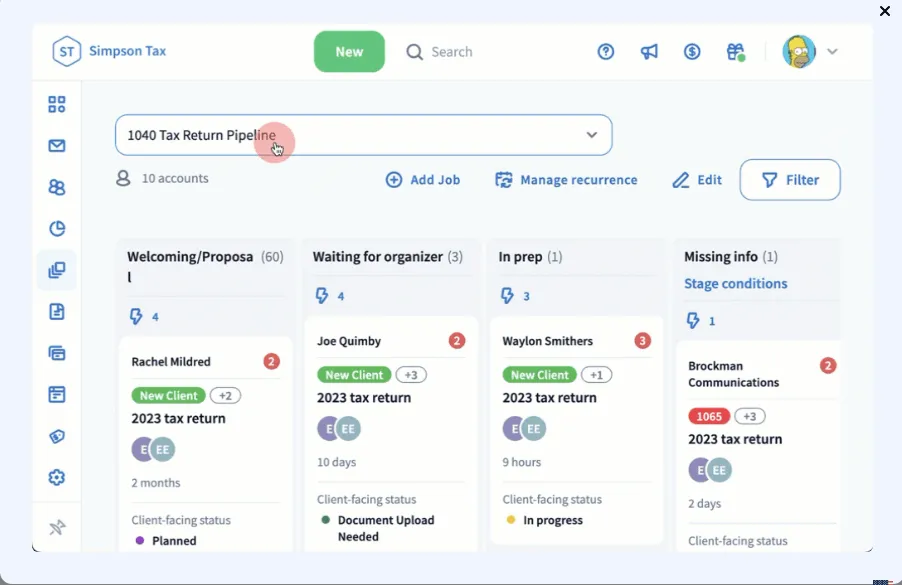
TaxDome’s pipeline-based system is visually impressive and powerful.
You create pipelines for different services, define stages, and set up automations that trigger as jobs move through the pipeline. It’s comprehensive and can handle complex conditional logic, but setting it up requires significant upfront investment.
Users report that while the system is powerful once configured, the initial setup can be time-consuming and complex.
Source: TaxDome
Canopy offers robust workflow automation with customizable templates and the ability to create recurring tasks and automated triggers.
Their recent AI investments promise to make workflows even smarter. The modular pricing means that full workflow capabilities might require upgrading to higher tiers.
Uku takes a three-level approach that’s both sophisticated and intuitive.
You create task templates, apply them to create client task plans, and then let the system automatically generate tasks based on those plans.
What sets Uku apart is their extensive automation capabilities. Users report seeing up to 20% more profit by discovering outdated agreements where they were billing for eight hours but employees were doing 20 hours of work, with one firm noting they can serve 38% more clients after a year of using the platform.
The modular approach means you can start with just CRM and tasks, then gradually add features, allowing firms to start working on day one with only the modules they need.
Client portal capabilities show who really understands clients
The client portal is where your firm’s efficiency meets your client’s experience, and each platform takes a notably different approach.
TaxDome’s client portal receives high praise from users.
It’s described as intuitive and user-friendly, with a white-labeled mobile app that clients actually use. The platform offers multi-language support, no-login e-signatures, and a “magic link” system that eliminates password hassles. Clients can upload documents, pay invoices, and communicate with their accountant seamlessly.
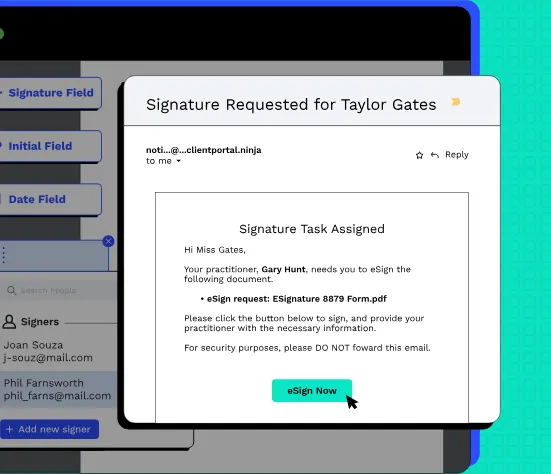
Canopy’s client portal is also strong, frequently highlighted as a standout feature.
It provides secure file sharing, e-signatures, and task management. The mobile app for both practitioners and clients enhances accessibility. The extensive custom branding capabilities allow firms to provide a consistent professional experience.
Source: Canopy
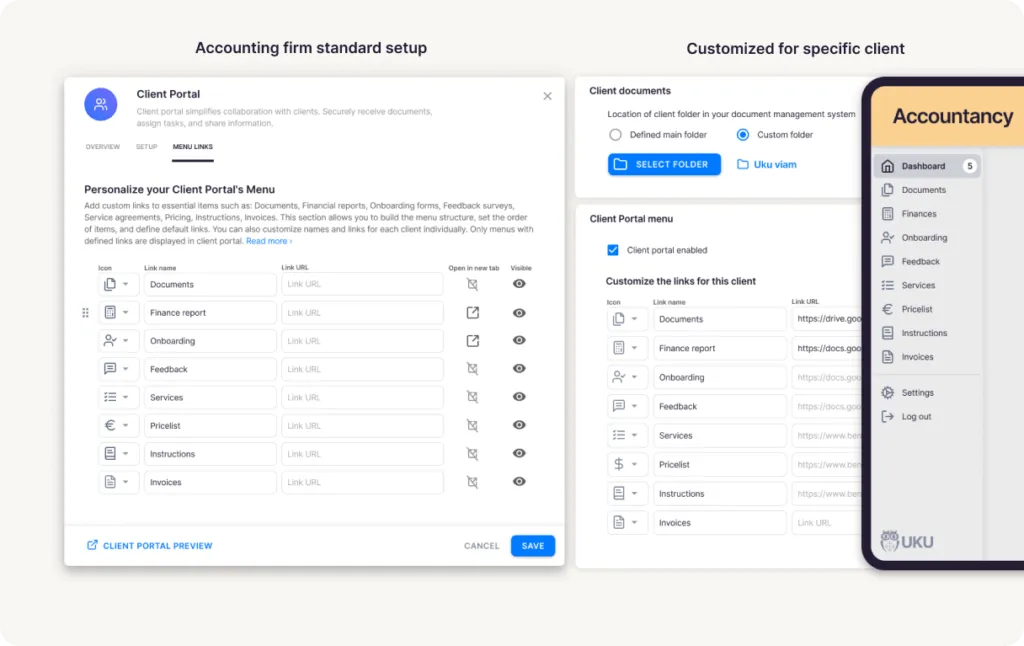
Uku’s integrated client portal represents one of their primary differentiators.
Unlike traditional portals where tickets must be connected to work items, Uku’s portal mirrors the exact same task on both sides. Clients and accountants work on the same item with all communication, actions, documents, logs, and time tracking in one place.
The “magic link” access system means clients never need to remember passwords. What’s particularly notable is the ability to create customizable menu links for each individual client, offering advanced personalization capabilities.
Firms can run onboarding with forms, share business insight reports, display price lists, and embed custom content with simple copy-paste functionality.
Source: Uku
Pricing models expose different business philosophies
The way these companies price their products reveals their fundamental business strategies and target markets.
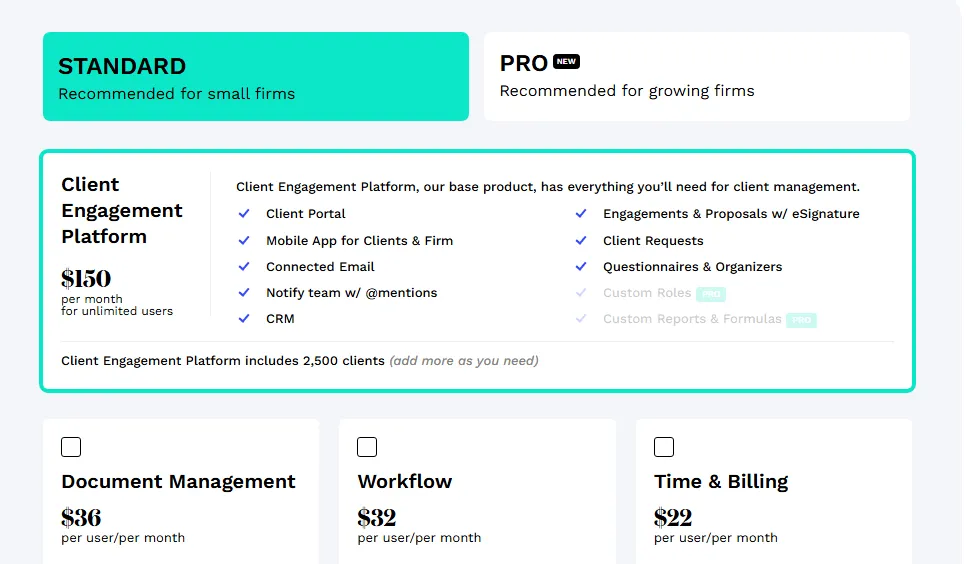
Canopy’s modular pricing starts accessible but can quickly escalate.
Small firms pay $45-66 per user per month for bundled plans, but growing firms face a complex pricing structure. You start with a base Client Engagement platform at $150/month, then add Document Management ($36/user/month), Workflow ($32-35/user/month), and Time & Billing ($22-25/user/month).
This à la carte approach means you only pay for what you use, but it also means costs can spiral as you add features. For a 10-person firm wanting all features at the Pro level, you’re looking at significant monthly expenses.
Source: Canopy
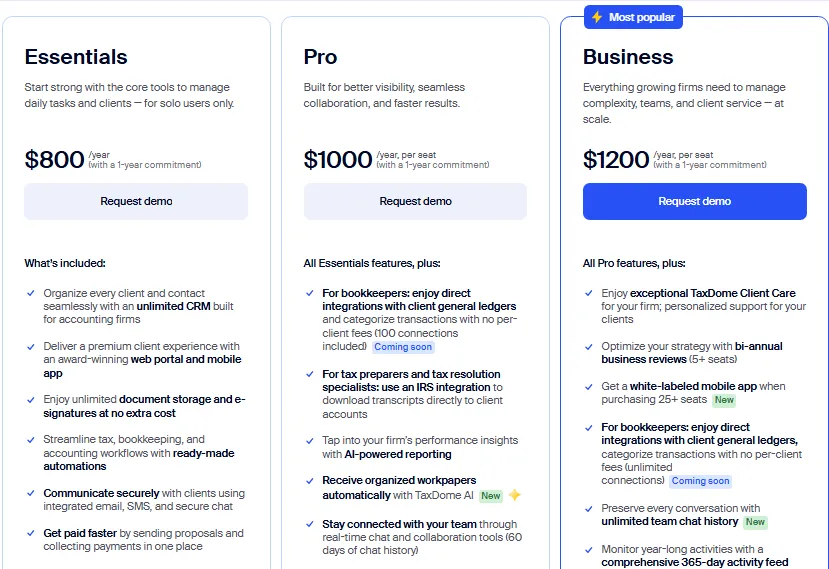
TaxDome takes the opposite approach with all-inclusive pricing.
The Essentials plan at $800/year for solos includes everything. The Pro plan at $1,000/year per user and Business plan at $1,200/year per user include all features, just with different levels of support and advanced capabilities.
There’s no nickel-and-diming for e-signatures or document storage. This transparency is refreshing, though the annual commitment and upfront cost can be daunting for smaller firms.
Source: TaxDome
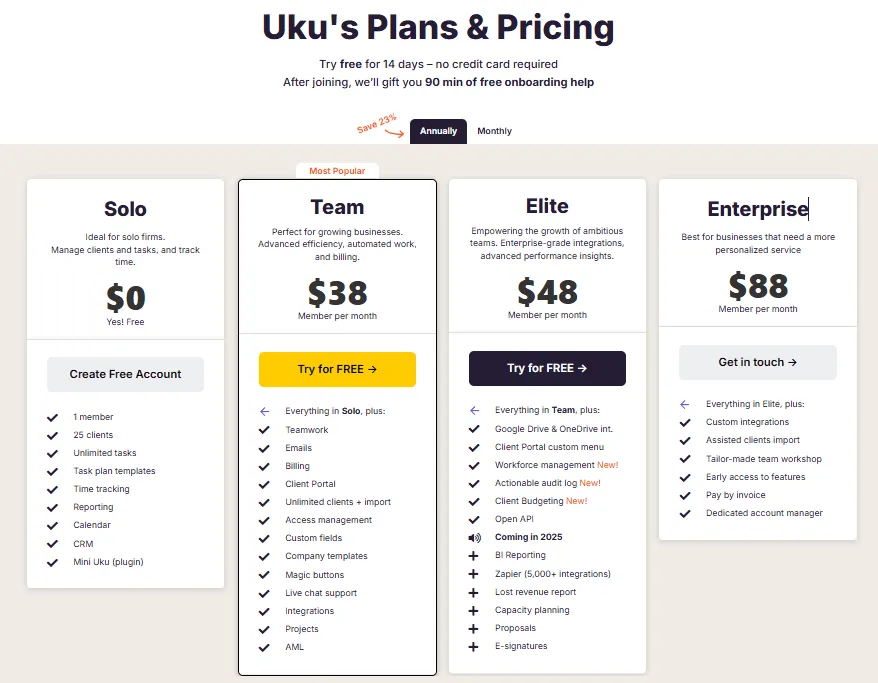
Uku’s pricing philosophy aligns with its bootstrapped nature and focus on accessibility.
The Team plan starts from $38/member/month with both annual and monthly billing options available, providing flexibility that competitors’ annual commitments don’t offer.
The Elite plan includes advanced features like Client Budgeting, Document Management, and E-signatures. Clients prefer paying monthly to test the system rather than large upfront annual commitments.
Pricing is available in multiple currencies (€, $, and £), reflecting the platform’s international focus. The 14-day free trial of the Elite plan shows confidence in their product while the approximately 23% discount for annual billing rewards committed users.
Source: Uku
Document management approaches differ dramatically
How each platform handles documents reveals their technical sophistication and user focus.
Canopy offers unlimited document storage with features like folder templates, file annotations, and a Desktop Assistant that bridges cloud and local storage.
Their Virtual Drive creates a seamless experience for users who prefer working with local files.
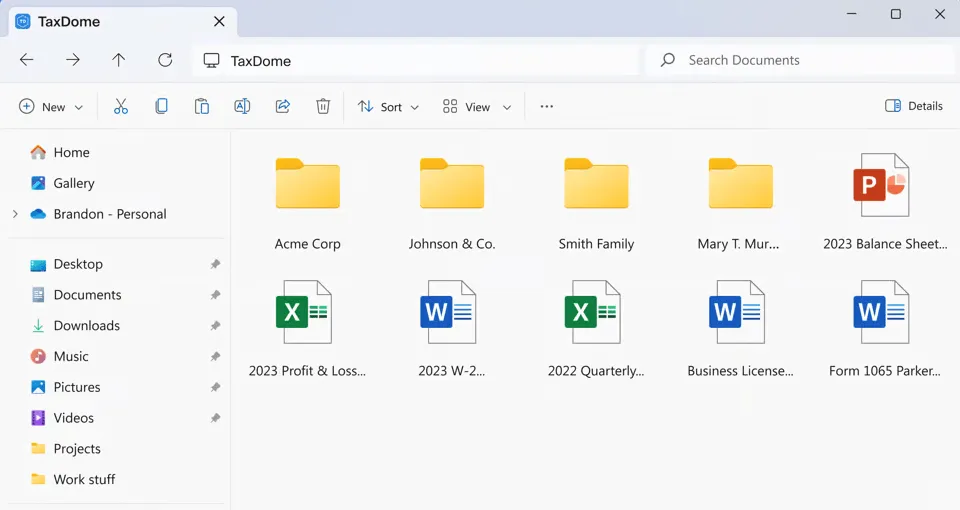
TaxDome also provides unlimited document storage but adds AI-powered capabilities through TaxDome AI.
This feature automatically analyzes uploaded documents, assigns relevant tags, and provides descriptive names. A generic “IMG_1234.pdf” becomes “2023 W-2 John Smith” automatically.
The Virtual Drive feature allows users to manage documents directly from their computer’s file explorer. This combination of unlimited storage and intelligent organization is impressive, though the initial setup to get everything organized can be time-consuming.
Source: TaxDome
Uku’s document management delivers automation capabilities that stand out in the market.
Documents can be submitted for digitalization with a single click, sending them directly into accounting software. The platform integrates seamlessly with Google Drive, Dropbox, and SharePoint, allowing firms to maintain their existing document management systems while leveraging Uku’s workflow capabilities.
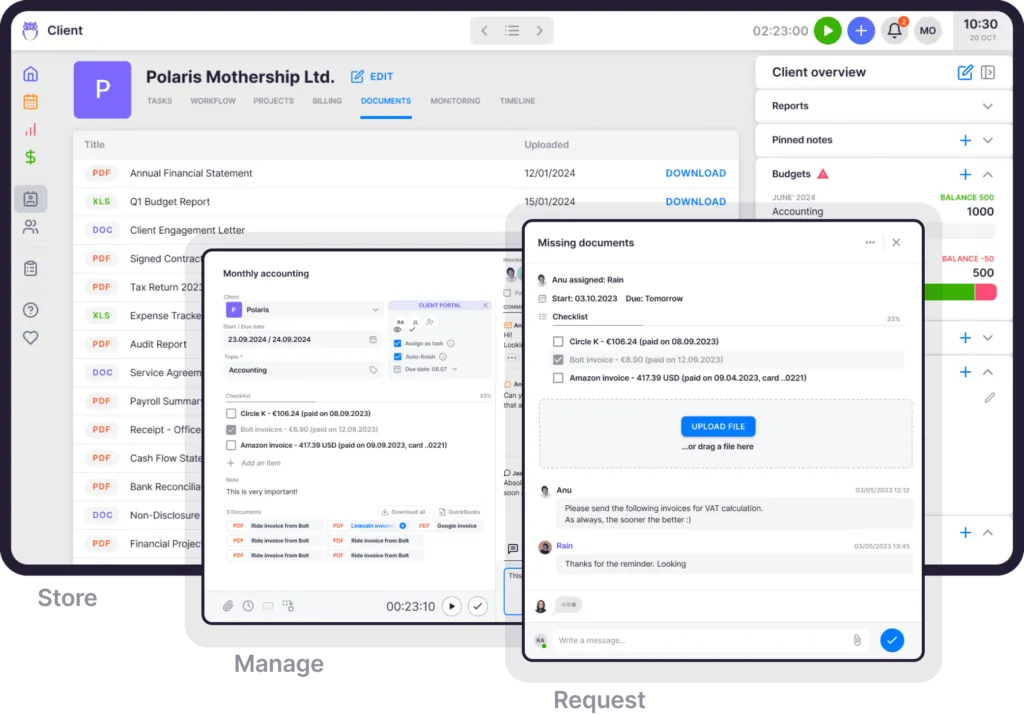
Documents attach to tasks, upload through the client portal, and organize automatically. While it may not have TaxDome’s AI features, users appreciate the one-click digitalization that streamlines document handling processes.
Time tracking and billing integration varies widely
The integration between time tracking and billing is where practice management platforms prove their worth, particularly for firms looking to improve profitability.
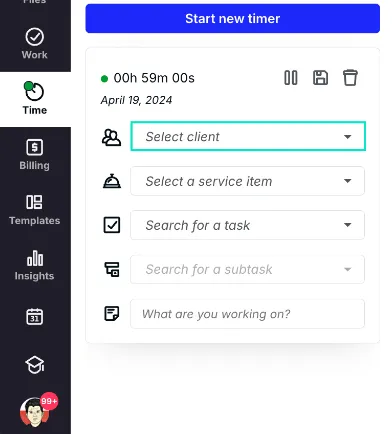
Canopy’s Time & Billing module offers multiple tracking methods and integrates with their workflow system.
Users can track time on tasks and subtasks, with automatic timer stops when switching tasks. The billing features support various models including hourly billing. However, some users find the billing module less robust than dedicated billing software, and remember, this is a paid add-on module at $22-25 per user per month.
Source: Canopy
TaxDome includes time tracking as part of its all-in-one package, with real-time tracking and manual entry options.
The integration with billing is smooth, allowing for automatic invoice generation from tracked time. The platform supports recurring invoices and automatic payment collection through Stripe integration. Users appreciate that this functionality is included without extra charges.
Uku’s automated billing system represents their primary competitive advantage, with the company claiming it can reduce invoice preparation time from hours to just 30 minutes.
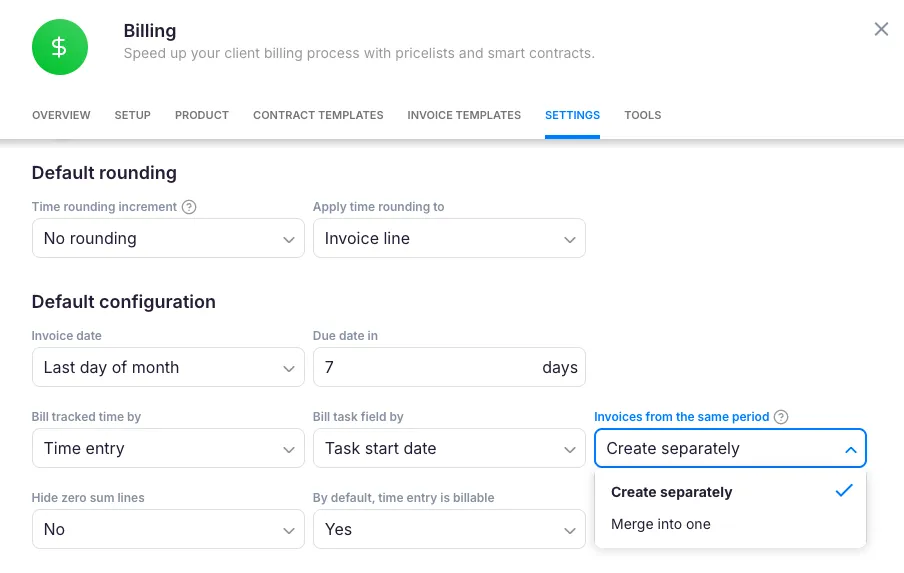
The platform offers sophisticated time tracking through multiple methods including a stopwatch, manual entry, and bulk time allocation across multiple tasks. The system supports complex price lists based on quantity, time, material, and ranges with different rates for different periods.
Sophisticated rounding rules based on entry, team, client, or month allow firms to properly bill for interruptions (a one-minute unplanned call can be automatically billed as 15 minutes). Everything is automated through ‘contracts’ where rules are set up once, then time tracking automatically calculates billable amounts in real-time.
Source: Uku
The hidden costs of implementation and onboarding
What vendors don’t prominently advertise are the real costs of getting their systems up and running.
Canopy mentions implementation fees for their growing firm plans, and while they offer onboarding support, getting everything configured properly takes time.
The modular nature means you might need to implement different modules at different times, extending the overall implementation period.
TaxDome’s all-in-one nature means everything needs to be set up at once, which users consistently describe as time-consuming and complex.
The learning curve is steep, particularly for firms without dedicated IT resources. While TaxDome offers daily demos and webinars, many firms find they benefit from working with TaxDome certified consultants for optimal setup. The payoff comes later, but the initial investment of time and potentially money for consultants is significant.
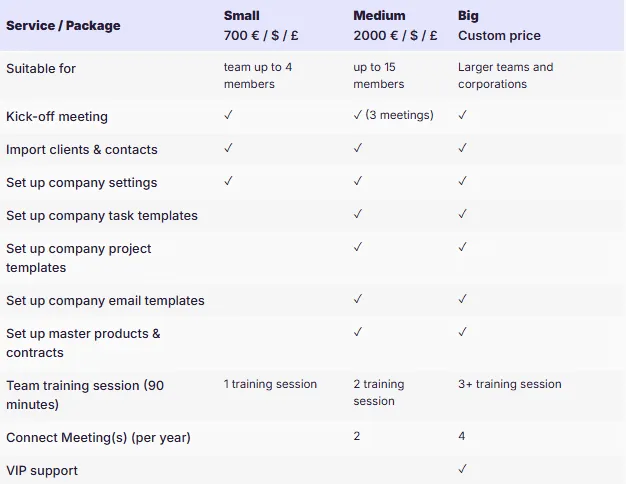
Uku offers onboarding assistance that includes team training sessions, and users consistently report that the platform is intuitive enough that extensive training isn’t needed.
The modular approach allows firms to import their data quickly and have automated plans ready to go, which resonates with firms hesitant to try new software after bad experiences. This “from Excel to greatness” positioning combined with fast and flexible deployment means new team members can typically get up to speed quickly without extensive training.
Source: Uku
Canopy vs TaxDome vs Uku: Which should you choose?
The choice between these platforms depends on your firm’s specific needs, resources, and philosophy about practice management.
Choose Canopy if:
- You’re a growing firm that needs scalable solutions
- Tax resolution is a significant part of your practice
- You prefer modular pricing to pay only for what you use
- You’re excited about AI-powered features and continuous innovation
- You have the budget for a premium solution and potential implementation costs
- You can tolerate occasional bugs in exchange for cutting-edge features
Choose TaxDome if:
- You want everything included from day one with no hidden costs
- Visual pipeline-based workflows appeal to your organizational style
- You’re willing to invest significant time upfront for long-term efficiency gains
- Your firm values standardization and consistent processes
- You need strong multi-language support for international clients
- The client portal experience is your top priority
Choose Uku if:
- You want to minimize your team’s admin time with one-click actions
- You value ultra-fast onboarding and modular scaling
- You need multilingual or multi-currency support for international operations
- You’re transitioning from Excel and want the easiest implementation
- You require flexible monthly pricing rather than annual commitments
- You need powerful automated billing capabilities that can reduce invoicing time from days to minutes
- You prefer working with a bootstrapped company that’s customer-funded
- Budget consciousness matters but you don’t want to sacrifice functionality
The reality is that all three platforms can transform your practice.
Canopy offers the venture-backed promise of continuous innovation and AI-powered futures. TaxDome provides the security of an all-inclusive solution with excellent standardization capabilities.
But Uku proves that you don’t need hundreds of millions in funding or complex setup processes to deliver powerful, efficient practice management.
Sometimes the best choice isn’t the biggest or the loudest.
It’s the one that actually makes your daily work easier while delivering the sophisticated capabilities you need to grow. That’s the philosophy Uku has followed since 2017, and with 1000+ clients globally and reported 120% yearly growth, they must be doing something right.
Ready to see how practice management can be both powerful and genuinely easy to use? Start with Uku’s 14-day free trial of the Elite features and discover a system your team will actually enjoy using.

Founder & Visionary at Uku. Building the future of accounting practice management — where AI handles the routine so accountants can focus on what matters.

Ready to upgrade your practice management?
Join 1,000+ accounting firms already using Uku to save time and grow their business.
Related articles

6 TaxDome Alternatives: Specialized Practice Management Tools for Accounting Firms (2026)
7 Best Canopy Alternatives: Practice Management Tools for Growing Accounting Firms In 2026

Canopy Review: Is This Practice Management Software Right for Your Needs In 2026?