

Karbon Review 2026: Is This Practice Management Platform Right for You?

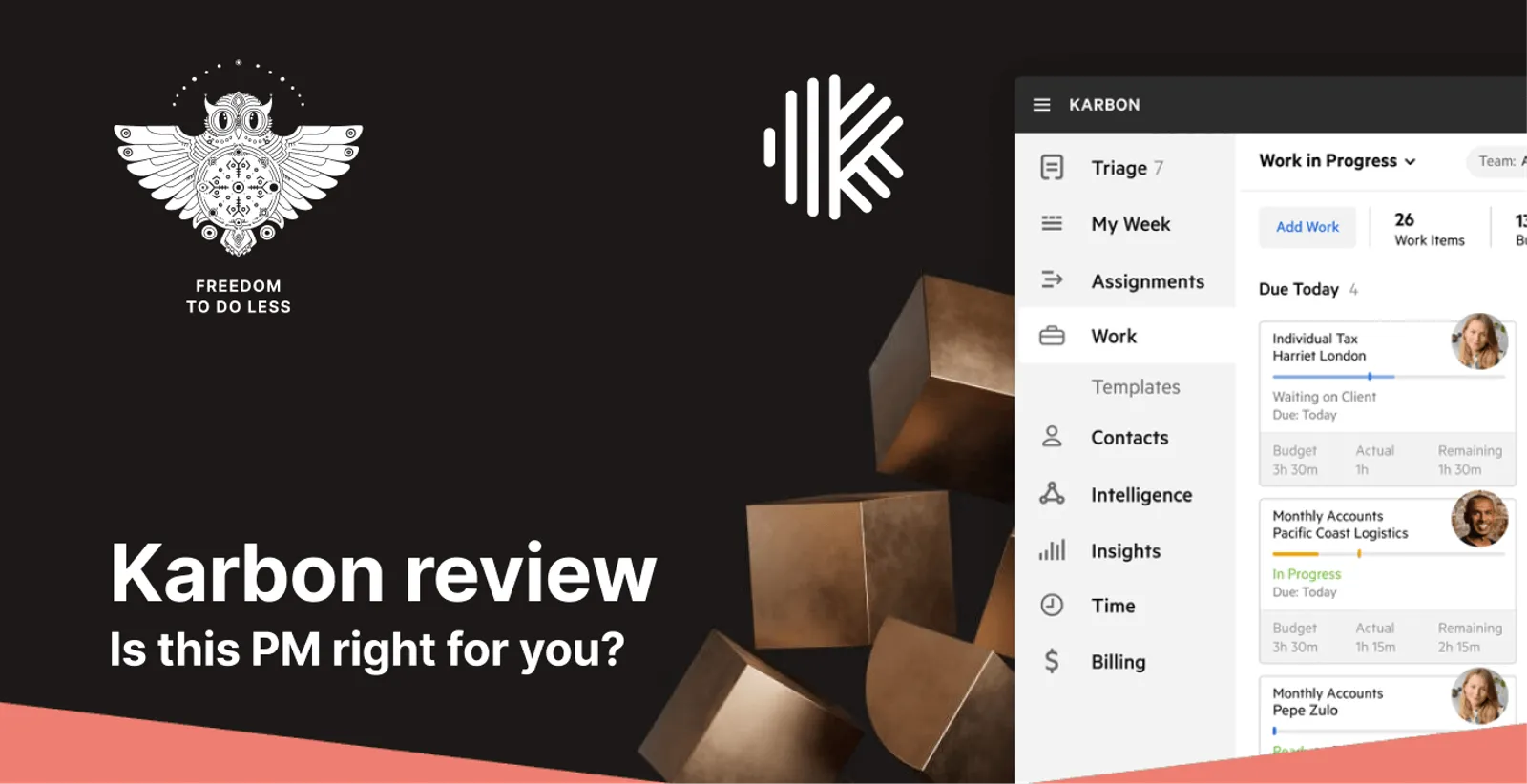
Karbon has established itself as a comprehensive practice management platform for accounting firms, with over 33,000 accounting professionals using it daily across 34 countries.
With its sophisticated workflow automation, deep email integration, and recent evolution toward AI-powered features through “Practice Intelligence,” it represents one of the most feature-rich solutions in the accounting software market. But as firms evaluate their options, the platform’s enterprise-grade complexity raises an important question: is all that sophistication necessary for every accounting practice?
To create this Karbon review, I’ve analyzed the platform extensively. I believe it’s the ideal choice if:
- You need comprehensive workflow automation with complex branching logic
- You want deep email integration that transforms communication into actionable workflows
- You require advanced analytics and AI-driven insights for strategic decision-making
- Your firm has the resources for extensive onboarding and training
- You’re managing multiple teams with sophisticated collaboration needs
However, Karbon might not be the best choice if:
- You want to minimize your team’s admin time with automated billing
- You’re a growing firm (10-50 people) that needs modular scaling
- You need a solution you can implement quickly without extensive training
- You’re currently using Excel and want the smoothest possible transition
- You want sophisticated billing automation without enterprise complexity
In this case, you should consider Uku: a practice management platform trusted by thousands of customers worldwide that takes a modular approach to features. With its industry-leading automated billing system, integrated client portal, and ability to get firms operational quickly, Uku proves that powerful automation doesn’t require months of implementation. Their customers report significant time savings, with some reducing invoicing time from days to just 30 minutes.
Because of that, I’ve included a detailed look at Uku later in this Karbon review, as the best alternative for firms seeking sophisticated automation with modular simplicity. If you’re ready to explore a system your team will enjoy using, you can start with Uku’s 14-day free trial.
Table of contents:
- What is Karbon?
- Karbon Pros & Cons
- Karbon Review: How it Works & Key Features
- Where Karbon Falls Short
- Top Karbon Alternative for Modular Growth: Uku
- Karbon or Uku: Comparison Summary
- Final Verdict
What is Karbon?
Karbon was founded in 2014 by Stuart McLeod, John Freeman, and Ian Vacin. McLeod and Freeman had previously founded Paycycle, which was acquired by Xero in 2011, where they then worked alongside Vacin. The three founders identified a gap in the market for practice management software that could solve the key problems accountants faced while integrating smoothly with their existing tools.
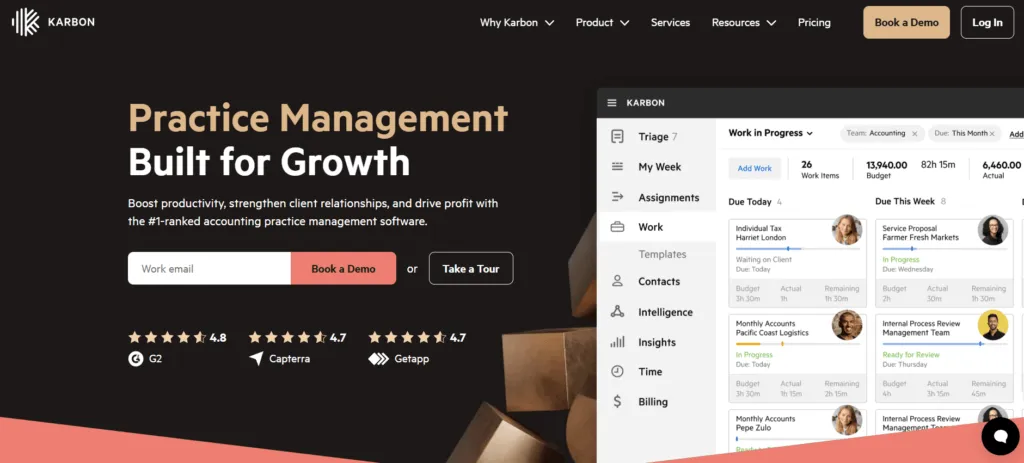
Initially positioned as “collaborative work management software for accounting firms,” Karbon focused on bringing teams, clients, and data into a single platform. The emphasis was on moving away from siloed email inboxes and disjointed systems to create unified, transparent workflows.
Today, Karbon has evolved into what it calls the “global leader in accounting practice management software.” The platform now includes:
- Workflow management
- Client relationship management (CRM)
- Billing and payments
- “Practice Intelligence” analytics
- AI-driven features, including predictive insights and intelligent automation
With the 2023 leadership transition that brought Mary Delaney as CEO, Karbon continues to push toward becoming a comprehensive platform focused on data-driven practice optimization.
The ideal Karbon customer is a growth-oriented accounting firm, ranging from small to large enterprises, that values sophisticated automation, deep collaboration features, and data-driven decision making. These firms typically have complex workflows, multiple team members, and are ready to invest both financially and in terms of learning curve to achieve operational excellence.
Karbon Pros & Cons
| Pros | Cons |
|---|---|
| ✅ Unified platform bringing email, tasks, and client data together | ❌ Premium pricing starting at $59/user/month |
| ✅ Powerful workflow automation with hundreds of pre-built templates | ❌ Steep learning curve for new users |
| ✅ Deep email integration with unique Triage feature | ❌ No permanent free plan (14-day trial only) |
| ✅ Practice Intelligence analytics with separate AI features | ❌ Can be overwhelming for simple workflows |
| ✅ Strong collaboration tools for team coordination | ❌ Limited mobile app functionality |
| ✅ Comprehensive integration ecosystem | ❌ Complex implementation for smaller firms |
Karbon Review: How it Works & Key Features
Work Management with Email Triage
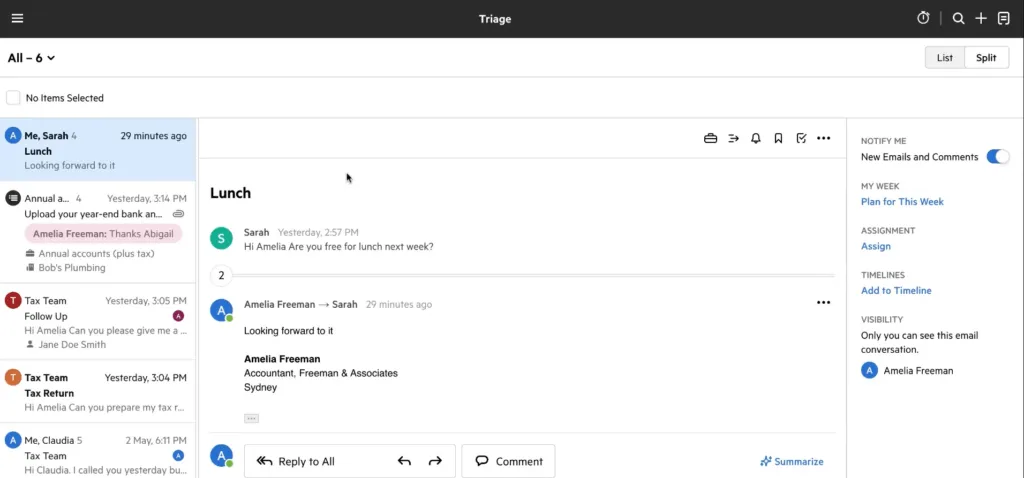
At the heart of Karbon is its unique approach to work management, centered around the Triage feature.
All emails from integrated Gmail or Microsoft 365 accounts flow into a central Triage inbox, where they become actionable items rather than just messages. Users can comment on emails for internal collaboration, assign them to colleagues, or link them to existing work items. While emails can be added to work items and used to create tasks within those items, the process involves multiple steps rather than direct conversion.
Source: Karbon
Work items serve as the central hub for all job-related information, containing tasks, documents, notes, and email correspondence. The platform provides hundreds of pre-built workflow templates and allows firms to create custom workflows with triggers, conditions, and automated actions.
Tasks within work items can be organized into checklists with dependencies, ensuring certain steps cannot begin until prerequisites are complete.
The My Week view gives each team member a personalized dashboard. It is divided into the following buckets:
- “Working on Now”
- “This Week”
- “Next Week”
- “Later”
Users can drag and drop items between these sections to organize their workload.
The Work section provides a firm-wide Kanban board where work items move through customizable status columns, offering clear visibility into the entire firm’s workflow.
Client Management and Portal
Karbon’s client management system goes beyond basic CRM functionality.
Each client profile stores comprehensive information including contact details, communication history, documents, and custom fields that firms can define based on their specific needs. The system supports Client Groups for managing related entities like family businesses or multiple company structures.
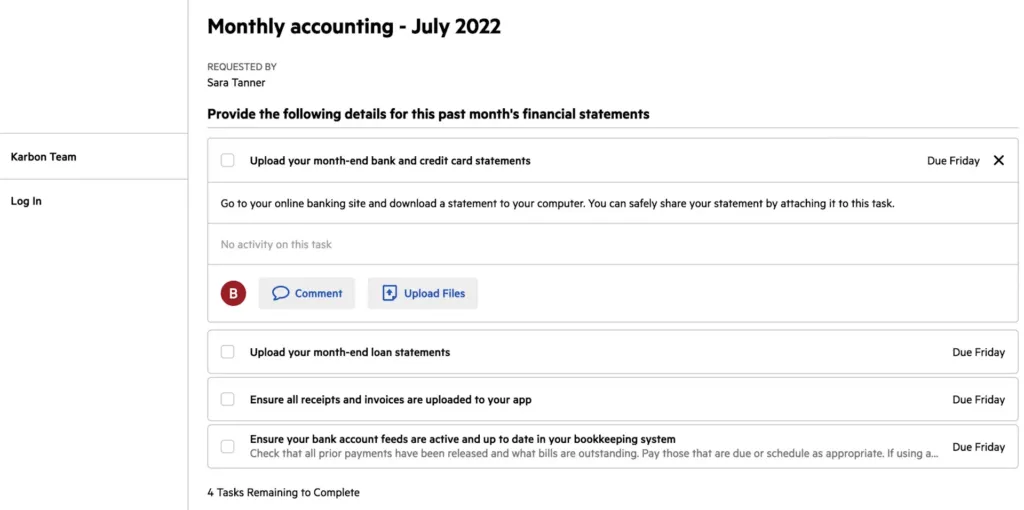
The client portal allows clients to upload documents, complete tasks, and communicate with their accountants. Some features use “magic links” that eliminate password requirements for specific requests, while the full portal may require authentication.
Source: Karbon
Firms can customize the portal with their branding. Client tasks can be assigned with automatic reminders, reducing the time spent chasing information.
Activity timelines provide a chronological record of all interactions with each client, ensuring any team member can quickly understand the full context of the relationship. This shared history includes emails, notes, tasks, and comments, creating a single source of truth for client information.
Practice Intelligence and Analytics
Karbon’s Practice Intelligence represents its analytics capabilities for practice management.
The platform includes 10 live dashboards covering areas like billing, budgets, client communication, email response times, and work-in-progress tracking, with additional templates available. These dashboards update daily at 8 AM local time, providing near real-time insights into firm performance.
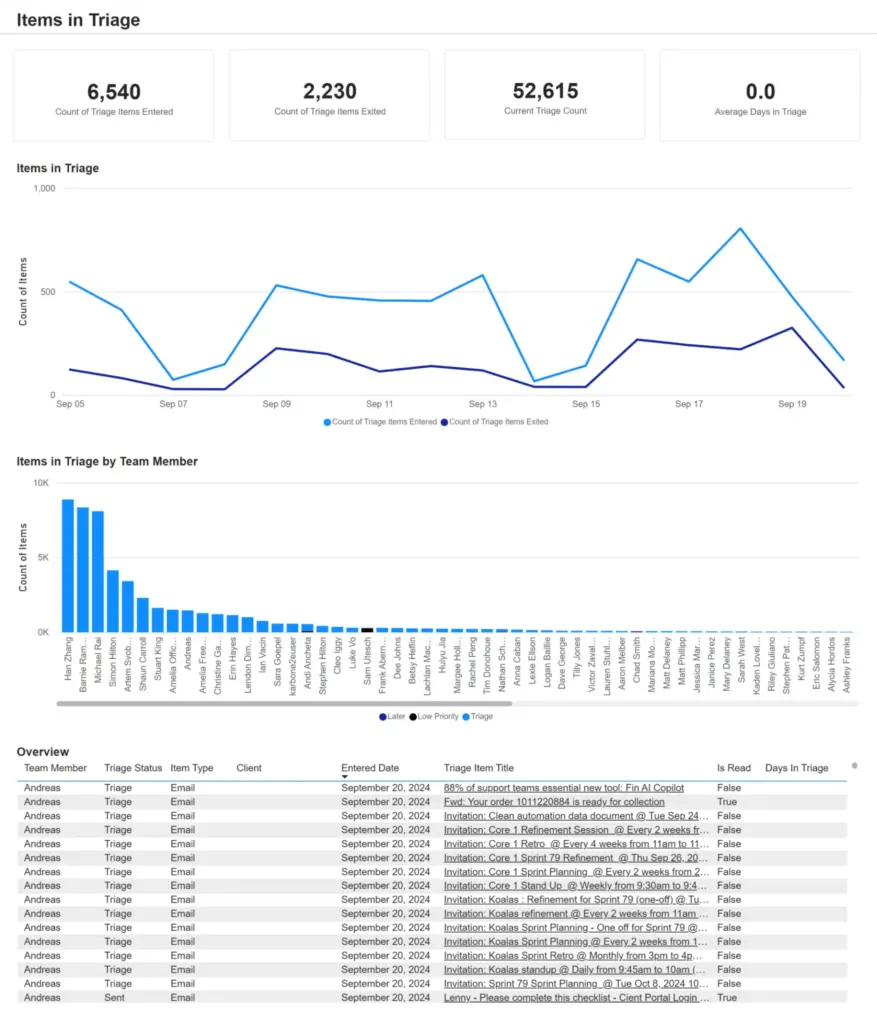
Karbon’s AI capabilities, offered as a separate feature set, extend beyond reporting. The platform uses artificial intelligence to prioritize emails based on urgency and sentiment, generate email drafts, and provide summaries of lengthy communication threads. The platform can suggest task assignments based on team member expertise and past work patterns.
For firms needing custom analytics, Karbon provides access to its data warehouse through a Snowflake connector. This allows connection to business intelligence tools like Power BI for creating highly customized reports. The platform tracks system activities for accountability, though restoration of deleted items requires contacting Karbon Support.
Billing and Payments
The billing feature, launched in early 2024 and powered by Stripe, integrates directly with Karbon’s workflow management.
Time tracked on tasks automatically flows into invoices. The system supports various billing methods including time and materials, fixed fees, and recurring billing arrangements. Karbon also offers Rate Plans that allow firms to define multiple rate tables with different effective dates and role-specific rates.
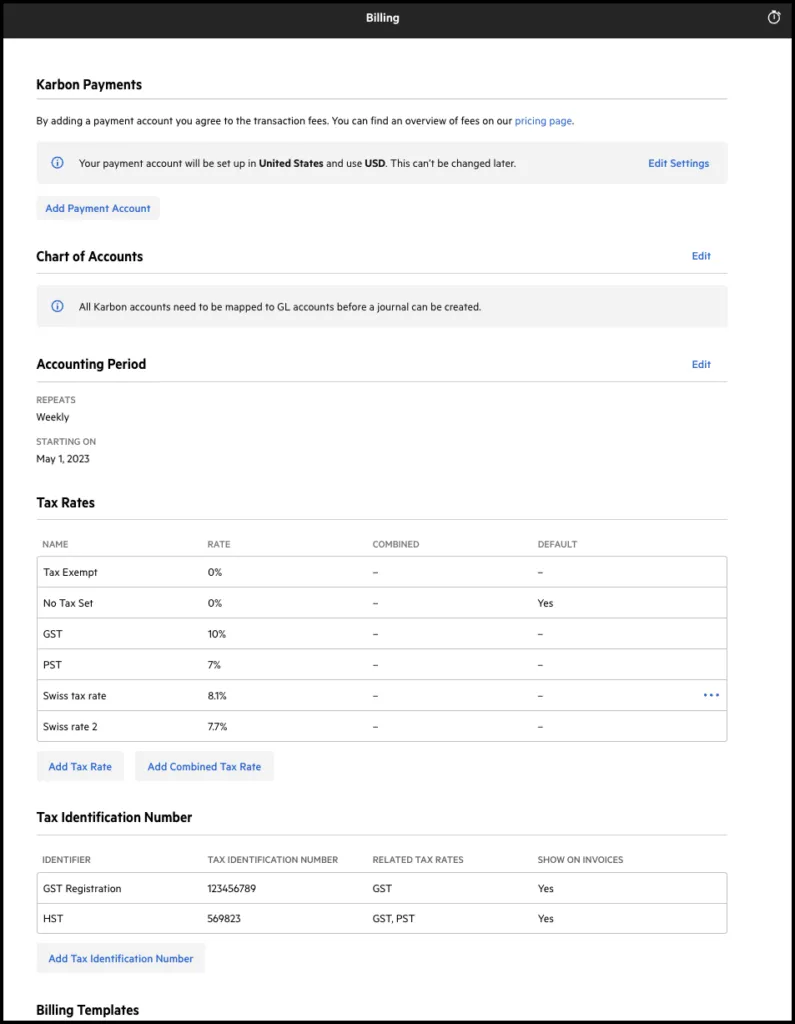
Source: Karbon
Invoice generation can be automated based on completed work, with the ability to review and approve before sending. Clients can pay directly through Karbon using credit cards or ACH transfers, with invoices typically being paid nine days earlier than those requiring manual payment. The platform provides real-time reporting on work-in-progress, realization rates, and aged receivables.
Where Karbon Falls Short
While Karbon excels at providing comprehensive functionality, several limitations become apparent for certain users. These constraints reveal a platform optimized for sophisticated operations rather than modular flexibility.
Overwhelming Complexity for Growing Firms: Too many features and options can slow down firms that need to grow gradually. What should be simple tasks, like setting up basic client workflows, require navigating through multiple menus, understanding dependencies, and configuring various settings. Users frequently report needing significant time to fully understand and utilize the platform’s capabilities.
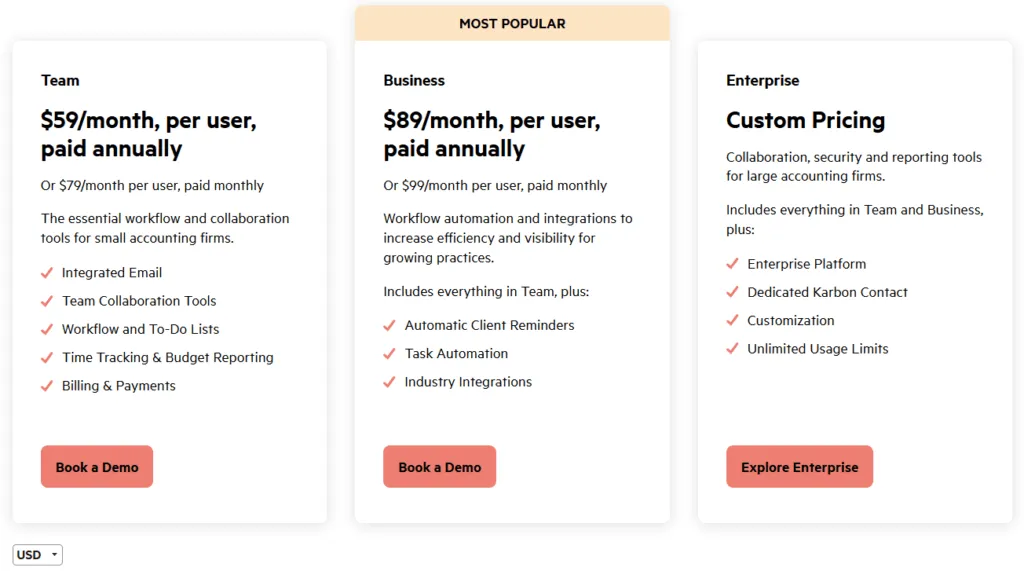
Premium Pricing Barriers: With no permanent free tier and starting prices at $59 per user per month, Karbon represents a significant investment. For a five-person firm on the Business plan at $89 per user per month, that’s $445 monthly or $5,340 annually. This pricing structure makes it inaccessible for firms testing the waters or those with tight budgets.
Steep Learning Curve: The platform requires substantial time investment for proper implementation. Firms often need dedicated training sessions, and while Karbon offers group onboarding sessions, the self-service data import in lower tiers means teams must largely figure things out themselves. This learning curve represents hidden costs in terms of time and potential disruption to existing workflows.
Implementation Complexity: While Karbon does offer data import capabilities including Excel/CSV support, the overall implementation process remains complex for smaller firms. The platform’s comprehensive nature means that even with import tools available, firms face a significant setup and configuration process to fully utilize all features.
These limitations reflect Karbon’s optimization for larger, established firms with dedicated resources. However, they create clear opportunities for alternatives that prioritize modular growth, streamlined implementation, and faster time-to-value.
Top Karbon Alternative for Modular Growth: Uku
Uku addresses Karbon’s complexity challenges by taking a fundamentally different approach to practice management. Founded in 2017 in Estonia by Rain Allikvee and Jaanus Lang, Uku was built from the observation that existing practice management software was “unhandy, impractical and unsightly.” As a bootstrapped company that has also received grants for development, Uku serves thousands of customers worldwide and has proven that sophisticated automation doesn’t require enterprise complexity.

Industry-Leading Automated Billing
Uku’s automated billing system transforms what traditionally takes days into a much faster process. The platform reports that firms with hundreds of clients have reduced their invoicing time from multiple days to just 30 minutes.
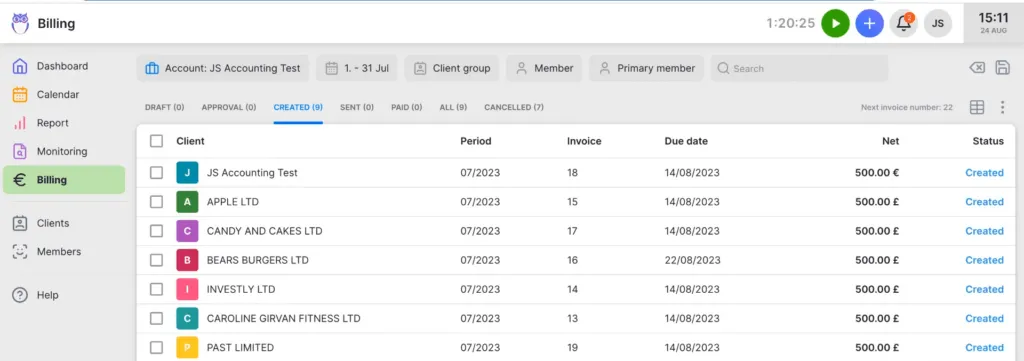
Unlike basic billing features, Uku supports complex price lists based on quantity, time, material, and ranges with different rates for different periods. The system handles sophisticated rounding rules that can be applied at various levels, allowing firms to properly bill for interruptions and unplanned work.
Everything is automated through “contracts” where rules are set up once, then time tracking automatically calculates billable amounts. The billing system includes monitoring features that flag when agreed volumes are exceeded. According to customer case studies shared by Uku, some firms have discovered significant inefficiencies in their billing practices after implementing the system.
Truly Integrated Client Portal
Uku’s portal design ensures that clients and accountants work on the same task, with clients seeing the task checklist, files, and description just like the accountant. This mirrors the exact same item on both sides. When clients make requests through the portal, notifications appear for the responsible accountant, enabling immediate response and time tracking within that same task environment.
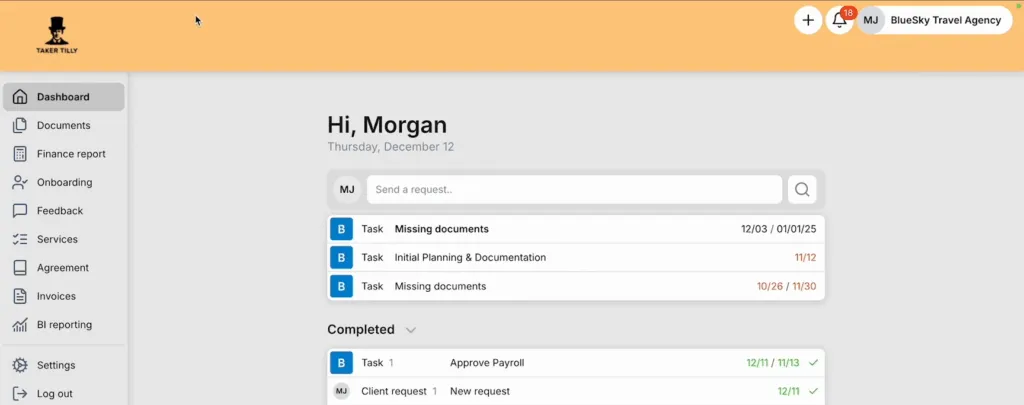
The client portal is highly customizable. Firms can:
- Create unique menus for each client
- Run onboarding with forms
- Share business insight reports
- Display price lists
- Embed custom content with simple copy-paste functionality
Clients access the portal through “magic links” that eliminate passwords, receiving email notifications with direct links to their tasks where they can upload documents, mark items complete, and communicate with their accountant. The portal can be fully branded with the firm’s logo, colors, and custom domain as part of the paid plans.
Modular Implementation Approach
Like an iPhone where you start with basic functionality and add apps as needed, users can begin with just CRM and tasks on Uku’s free Solo tier, then gradually add features through Team and Elite plans. This flexibility is designed for growing teams that need agility. Firms can start working quickly, activating only the modules needed and scaling up as they grow.
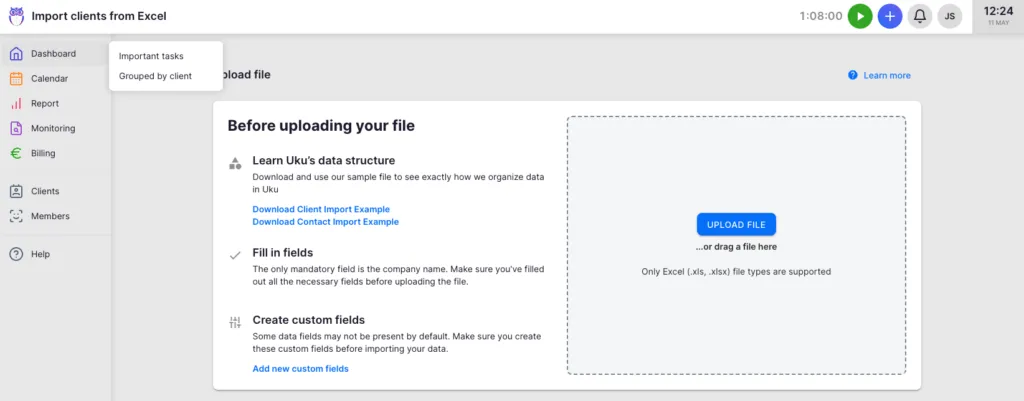
A crucial advantage is Uku’s comprehensive client data import capabilities. The accounting practice management software supports both Excel imports (XLS/XLSX) with workflow templates and direct client database synchronization from accounting software like Xero, QuickBooks, and e-conomic. This dual migration approach eliminates lengthy implementations, enabling accounting firms to seamlessly transition their client management whether from spreadsheets or existing accounting platforms.
Streamlined Task Management and Time Tracking
Where Karbon’s work management involves multiple concepts like Triage, work items, and complex workflows, Uku simplifies task management. Users can set up master workflow templates for common services, then apply these to individual clients with customization as needed. The platform also allows for one-off tasks outside of structured plans.
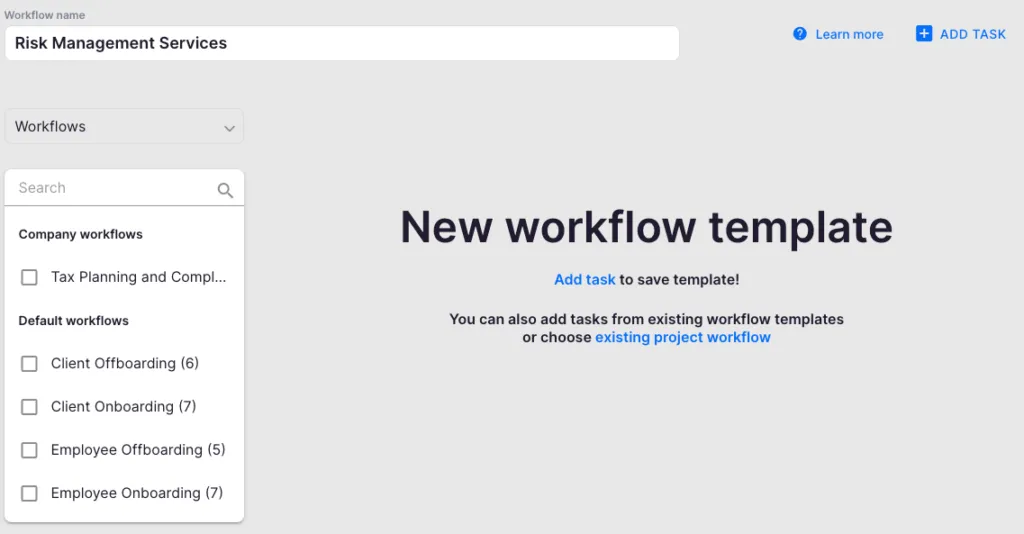
Tasks appear on team members’ dashboards at the right time based on recurrence settings, which can be weekly, monthly, quarterly, or yearly. The system handles date-based recurrences intelligently, accounting for weekends and holidays with options to show before, show after, or keep the original date.
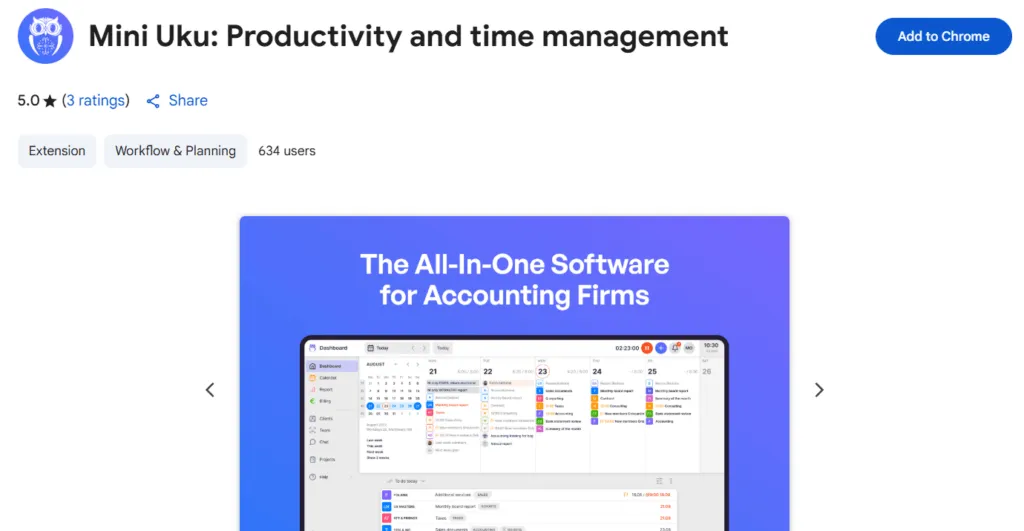
Uku’s time tracking offers multiple methods including a stopwatch, manual entry, bulk time allocation across multiple tasks, and even a browser plugin called “Mini Uku” that allows tracking from any website. The system distinguishes between billable and non-billable hours and includes flextime management for tracking overtime and vacations.
Transparent Pricing and Enterprise Support
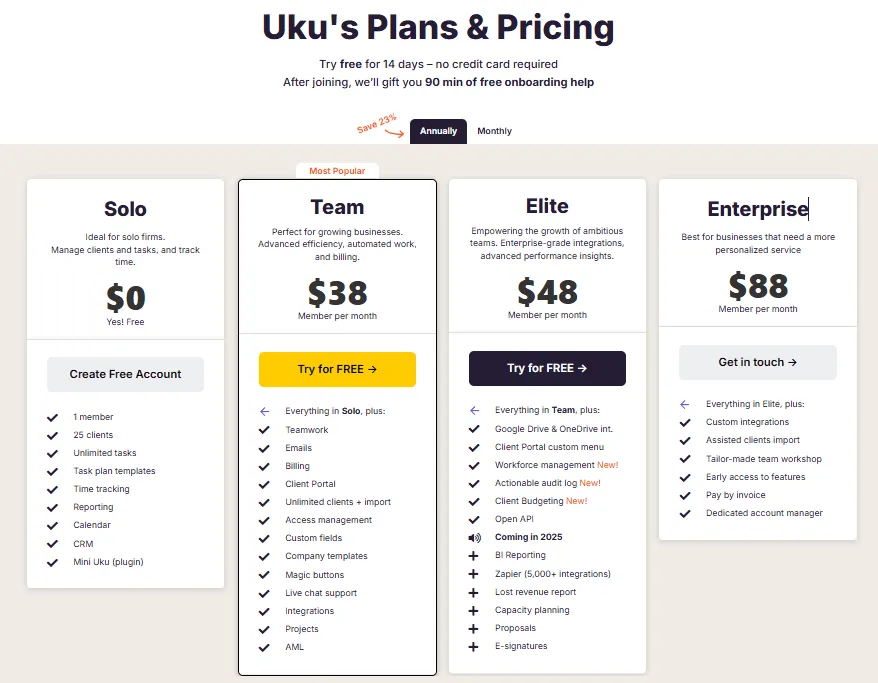
Uku’s pricing structure reflects its commitment to accessibility and growth. Paid plans start at $38 per user per month for the Team plan, with Elite at approximately $42, and Enterprise with custom pricing. Crucially, Uku provides 90 minutes of free onboarding assistance and maintains excellent customer support according to user reviews.
The platform uses TLS 1.3 encryption and hosts data on enterprise-grade cloud servers in Germany (EU), with the underlying infrastructure maintaining SOC 2 compliance. For enterprise clients, their in-house development team can create custom integrations and features.
Karbon or Uku: Comparison Summary
| Aspect | Karbon | Uku |
|---|---|---|
| Starting Price | Team: $59/user/month (paid annually) | Team: $38/user/month |
| Learning Curve | ⭐⭐ Steep, requires extensive training | ⭐⭐⭐⭐ More intuitive, quicker setup |
| Billing Automation | ⭐⭐⭐⭐ Advanced with Rate Plans | ⭐⭐⭐⭐⭐ Sophisticated with complex rules |
| Implementation Time | Weeks to months | Days to weeks |
| Email Integration | ⭐⭐⭐⭐⭐ Deep with Triage feature | ⭐⭐⭐ Basic integration |
| Analytics | ⭐⭐⭐⭐⭐ Practice Intelligence & AI features | ⭐⭐⭐⭐ Real-time monitoring & reporting |
| Client Portal | ⭐⭐⭐⭐ Branded and customizable | ⭐⭐⭐⭐⭐ Integrated task mirroring |
| Excel Migration | ⭐⭐⭐ Import support available | ⭐⭐⭐⭐⭐ Smooth transition path |
| Target Firm Size | Small to large enterprises | Growing teams and mid-sized firms |
Final Verdict
The choice between Karbon and Uku ultimately depends on your firm’s growth stage and operational priorities.
👉 Choose Karbon if your firm:
- Requires sophisticated workflow automation with complex dependencies
- Values deep email integration as central to operations
- Has the resources for extensive training and premium pricing
- Has dedicated resources to manage the platform
- Manages complex client relationships needing advanced collaboration tools
- Focuses strategically on data-driven decision making through comprehensive analytics and AI features
- Is ready to invest significantly in both money and time to achieve operational excellence
Get started with Karbon today and transform your firm’s workflow!
👉 Choose Uku if you:
- Want to minimize your team’s admin time with sophisticated automated billing
- Need an approach that lets you scale gradually
- Value faster onboarding
- Are part of a growing team
- Are transitioning from Excel and need a smooth migration path
- Require complex billing capabilities with real-time monitoring
Uku proves that sophisticated automation doesn’t require months of training or enterprise budgets, delivering a system that teams can adopt more quickly.
Ready to simplify billing and speed up onboarding? Choose Uku and start scaling effortlessly today!
Both platforms serve their audiences well. Karbon pushes the boundaries of what practice management software can be, while Uku focuses on delivering sophisticated automation through simplified implementation. Your choice depends on whether you need comprehensive enterprise features or powerful automation that grows with you.

Founder & Visionary at Uku. Building the future of accounting practice management — where AI handles the routine so accountants can focus on what matters.

Ready to upgrade your practice management?
Join 1,000+ accounting firms already using Uku to save time and grow their business.
Related articles

Canopy vs Karbon (vs Uku): Which Practice Management Software Actually Fits Your Firm in 2026?
Financial Cents Review 2026: Is This Practice Management Software Right for You?

Financial Cents vs Karbon (vs Uku): Which Practice Management Software Actually Fits Your Firm in 2026?